At a glance
AKHQ and Kadeck are scored here on the same five criteria, 50 points in all: AKHQ 37 out of 50, Kadeck 29 out of 50. AKHQ takes its best score on Cost as teams grow (10 out of 10) and its lowest on Support and maintenance (5 out of 10). Cost a year, modelled: 8,640 US dollars, no licence fee. Kadeck takes its best score on Multi-cluster reach (9 out of 10) and its lowest on Cost as teams grow (4 out of 10). Cost a year: 3,840 published at 10 users, plus 2,880 this page's estimate.
AKHQ vs Kadeck, compared
Kpow meets 5 of 7 requirements on this page. One row is not a yes or no question.
Key takeaway
AKHQ is free under Apache 2.0, with no paid tier and no commercial support. Kadeck is commercial software from xeotek, and its governed edition is Enterprise, at 32 US dollars per user per month with a ten-user minimum. Its free tier is five users on one cluster connection with no OIDC, no masking and no audit logs, so it is a trial rather than a deployment, and the teams edition validates its licence online at every container start, which decides an air-gapped deployment. Kpow by Factor House is licensed per cluster from 4,500 US dollars.
Kpow live demo
Test the trade-offs in a live Kafka UI
You have compared AKHQ vs Kadeck. Open a live Kpow environment to test the everyday workflows a shared Kafka platform needs.
Built for platform and data teams managing shared Kafka clusters.
Try the Kpow demoWhat is AKHQ?
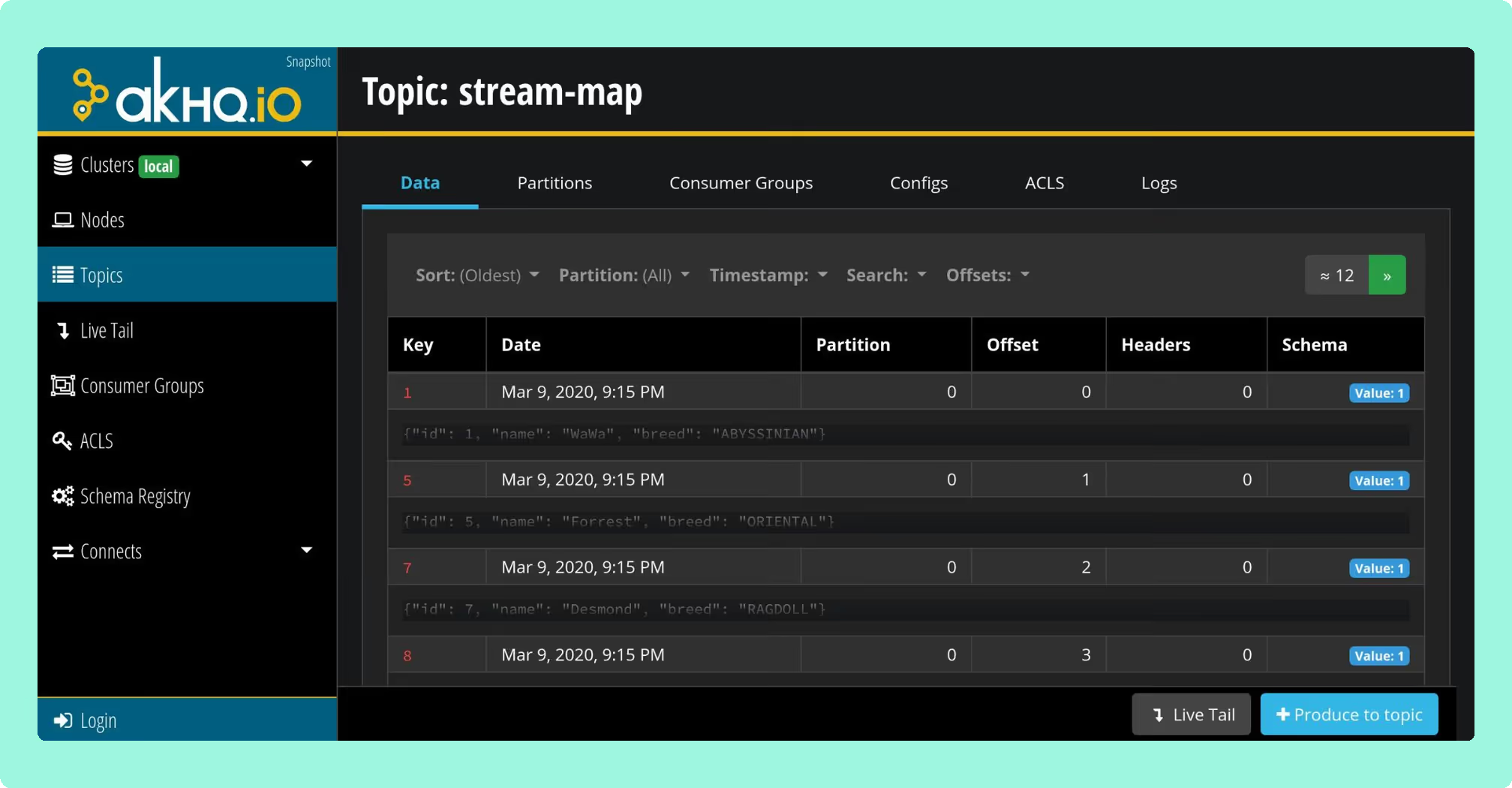
AKHQ is an open-source Kafka management UI under Apache 2.0, formerly KafkaHQ, self-hosted and built on Micronaut. One deployment reaches one cluster or many. Managing ACLs in a UI means managing Kafka’s own authorization model, so what the tool offers is a view onto rules the broker already enforces rather than a policy layer of its own.
- topic browsing, live tailing, producing, and consumer groups
- Schema Registry, Kafka Connect and ACL management
- role-based access with LDAP and OIDC
- 0.28.0 in August 2026, after 0.27.1 in May and 0.27.0 in March
There is no commercial edition, no hosted service and no paid support tier, and no feature is held back from the open release. The commit record is concentrated: the lead maintainer has 441 commits and the next human contributor has 82.
What is Kadeck?
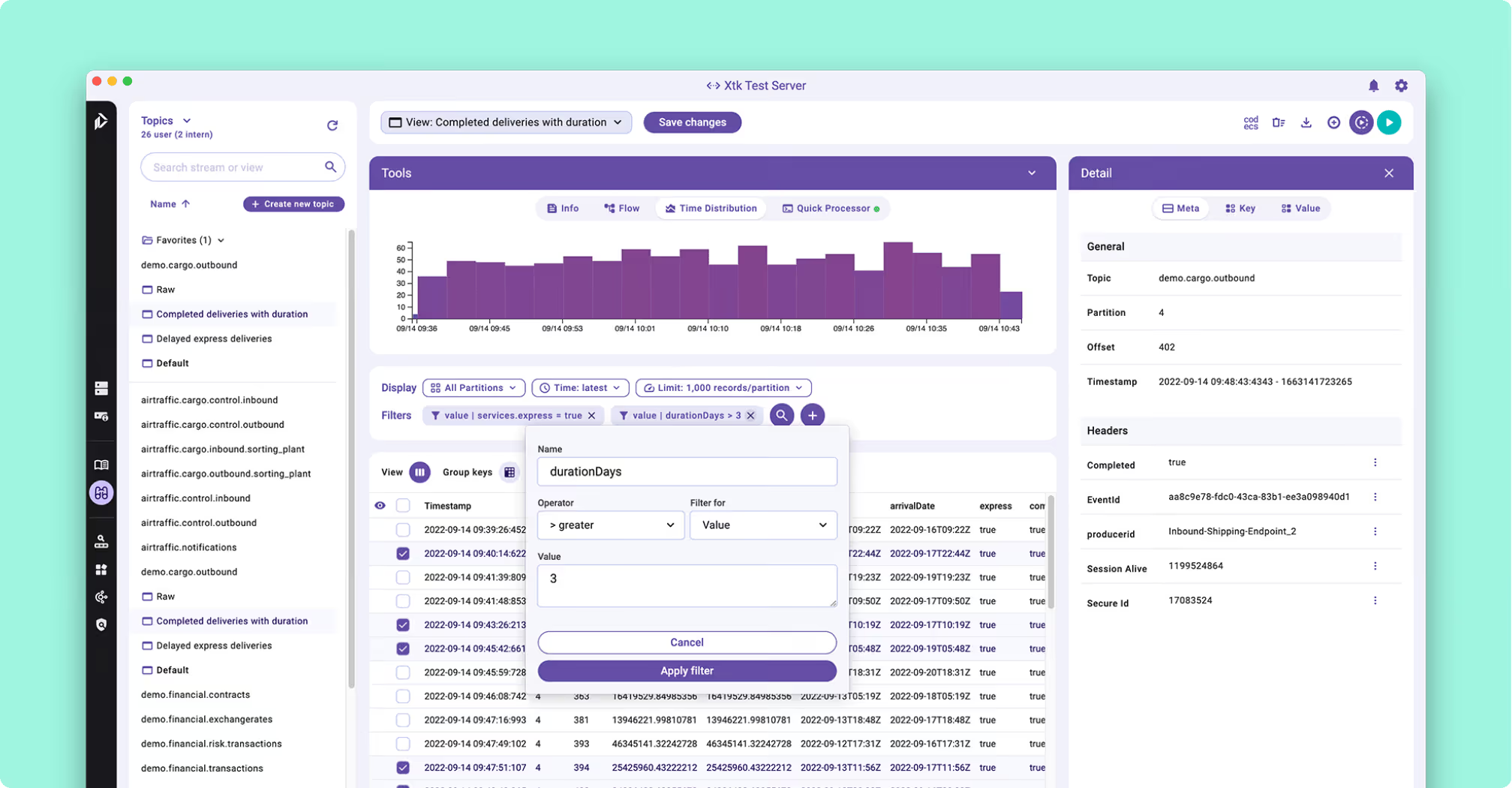
Kadeck is a commercially licensed Kafka management and data exploration tool from xeotek, a German vendor, and it is not open source. It ships as two product lines rather than two rungs of one ladder: a native desktop application for Linux, macOS and Windows, and a web and teams edition distributed as a Docker image, currently at version 7.0.4. Kafka, Redpanda and Amazon Kinesis are all supported as sources.
What it is built for is data exploration rather than cluster operations.
- Record view: Avro decoded through Schema Registry and laid out in columns instead of raw bytes.
- QuickProcessor: a JavaScript expression derives calculated fields from record values, with no streaming application to write.
- Dead-letter recovery: failed records isolated, transformed inline, previewed, re-ingested to the source topic, then purged with a delete-up-to-here.
- Metadata layer: schema fields documented externally, without modifying the Schema Registry or bumping a version.
What is the official 2026 pricing of AKHQ and Kadeck?
AKHQ costs nothing to license, and its whole cost is operator time: somebody sizes the JVM, reads the issue tracker before upgrading, and answers for it when it stops. There is no SLA, because there is nobody to escalate to.
Kadeck at a team of five is a choice between two things that do not fit. Teams Free covers five users on one cluster connection and carries no LDAP, no OpenID Connect, no data masking and no audit logs. Enterprise, the tier those four things live on, is 32 US dollars per user per month with a ten-user minimum, so a team of five pays for ten and the entry cost is 3,840 US dollars a year. At fifty people AKHQ is still free and Kadeck is 19,200 US dollars a year; floating licences are offered at thirty users or more, and they are still per user underneath.
The middle of the ladder is where a team can spend twice. Professional, at 19 US dollars per user per month on annual billing, is the desktop application line, and it carries no RBAC, no LDAP and no audit trail. A team that needs those does not upgrade into Enterprise from there. It re-buys, because desktop and teams are separate products rather than steps.
Where does each one run out?
The scoring is the same on both sides: five criteria, 10 points each, 50 in all, with every criterion counting once. Nothing sits behind a multiplier, so a total is the sum of its five marks and a reader can recompute it. The five are cost as teams grow, deployment footprint, support and maintenance, access control and audit, and multi-cluster reach, because those are the questions a Kafka interface is actually measured against after the first month: a second cluster, an access review with a date on it, an upgrade nobody owns, and a bill that moves when the team does. The widest gap between the two marks is on cost as teams grow, where AKHQ marks 10 and Kadeck marks 4. The marks come from the same matrix used on every comparison on this site, so a tool scores the same here as it does anywhere else, and the reason behind each mark is in the card below, under Why these scores.
The dependency figures in the cards below were read on 24 September 2026 from each project’s published release artefact and matched against the NVD and GitHub advisory databases, so they move whenever a release or an advisory lands. Running it yourself is common to both. What differs is whether somebody is contracted to produce the fix.
 Rank 1
 AKHQ
37 out of 50 Total
- Cost a year, modelled
- 8,640 US dollars, no licence fee
- Adding an engineer
- No change to the bill
- Governance
- Configuration you write and operate
- Cost as teams grow
- 10 out of 10
- Deployment footprint
- 8 out of 10
- Support and maintenance
- 5 out of 10
- Access control and audit
- 5 out of 10
- Multi-cluster reach
- 9 out of 10
Why these scores for AKHQ
- Cost as teams grow 10 out of 10
- The compare figure has it free under Apache 2.0, so adding an engineer does not change the bill, where Kadeck charges another seat. This page’s modelled cost of ownership is about 8,640 US dollars a year at 6 engineer-hours a month and 120 US dollars an hour; the 10 is for the bill not moving as the team grows, not for total cost.
- Deployment footprint 8 out of 10
- The compare figure gives no external dependencies, no database and no sidecar, against Kadeck’s Docker-only teams edition and its persistent external database.
- Support and maintenance 5 out of 10
- This page gives no SLA, because there is nobody to escalate to, against a project that is still shipping releases.
- Access control and audit 5 out of 10
- On this page, masking is four modes in global YAML, one filter per topic, and audit is opt-in to a Kafka topic covering modifications and not reads.
- Multi-cluster reach 9 out of 10
- On this page, one deployment reaches one cluster or many, where Kadeck’s free tier is one cluster connection.
This page's cost estimate: no licence fee, and about 6 engineer-hours a month to size the JVM, write the masking YAML and operate the audit topic in-house, at 120 US dollars an hour, is about 8,640 US dollars a year.
AKHQ’s governance is present and shallower than the feature list suggests. Masking takes four modes, but the filters live in global application YAML keyed on topic and field path, so what is hidden does not vary by who is looking, and only one filter per topic is supported.
Audit: opt-in, written to a Kafka topic the operator nominates, covering modifications and not reads.
Metrics: served on a Prometheus endpoint rather than drawn inside the tool, and there is no alerting.
Memory: constantly-increasing-memory reports raised in July 2022 and May 2025, both still open.
OIDC: the most active failure surface in the tracker, with new reports still arriving in August 2026.
Staying patched: release 0.28.0, cut on 6 August 2026, bundles 270 libraries and 18 of them carry a high or critical advisory. Sixteen of the eighteen were already public, with fixed versions already on Maven Central, on the day it shipped, and five of those are netty CVEs Kpow had already remediated in release 96.2 three weeks earlier: CVE-2026-44249, CVE-2026-45416, CVE-2026-45674, CVE-2026-47691 and CVE-2026-50010. The oldest has been open 108 days. Every jar AKHQ ships resolves to a coordinate, so this is a complete count rather than a floor, and each identifier can be checked at nvd.nist.gov. A shipped vulnerable library is exposure and remediation latency, not a working attack.
 Rank 2
 Kadeck
kadeck.com
29 out of 50 Total
- Cost a year
- 3,840 published at 10 users, plus 2,880 this page's estimate
- Product lines
- Desktop and teams, sold apart
- Free tier
- 5 users, 1 cluster connection
- Cost as teams grow
- 4 out of 10
- Deployment footprint
- 4 out of 10
- Support and maintenance
- 6 out of 10
- Access control and audit
- 6 out of 10
- Multi-cluster reach
- 9 out of 10
Why these scores for Kadeck
- Cost as teams grow 4 out of 10
- The compare figure gives Enterprise at 32 US dollars per user per month with a ten-user minimum, so 3,840 US dollars a year for any team smaller than ten. The published figures are 3,840 US dollars a year at the ten-user minimum and 19,200 US dollars a year at fifty.
- Deployment footprint 4 out of 10
- The compare figure has teams shipping only as a Docker image, the documented Kubernetes path wanting a persistent external database, and every container start making an online licence call.
- Support and maintenance 6 out of 10
- On this page, a commercial vendor, xeotek, stands behind it at version 7.0.4, but the page names no published SLA.
- Access control and audit 6 out of 10
- The compare figure puts LDAP, OpenID Connect, data masking and audit logs all on Enterprise, and Teams Free carries none of them.
- Multi-cluster reach 9 out of 10
- On this page, Kafka, Redpanda and Amazon Kinesis are all supported as sources on a paid plan, though the free tier is one cluster connection.
What it costs a year: Enterprise is 32 US dollars per user per month with a ten-user minimum, so the published price is 3,840 US dollars a year at ten users and 19,200 US dollars a year at fifty. On top of the licence, this page’s estimate of the running cost is 2 engineer-hours a month at 120 US dollars an hour, about 2,880 US dollars a year, so about 6,720 US dollars a year at ten users.
Kadeck’s free tier is one cluster connection, so Dev, Test, Stage and Prod is a paid plan before governance is even discussed. The teams edition ships exclusively as a Docker image, with no RPM, no native binary and no Helm chart, and the documented Kubernetes path wants a persistent external database.
Licence checks: every container start makes an online validation call, and an air-gapped or CI deployment needs challenge-response activation first.
Write path: no mechanism to stream derived or transformed data back into a topic, and no Kafka Streams or ksqlDB integration.
Export: CSV respects the column filters applied in the record table and JSON ignores them.
Deduplication: no built-in filter to show the newest record per key.
Which should you pick?
AKHQ is the pick for a team that wants the whole product free and self-hosted, because Kadeck’s free tier is five users on one cluster connection with no OIDC, no masking and no audit logs. Kadeck suits a small team buying data exploration and dead-letter recovery per seat. Where governance has to reach everybody without a per-user bill, Kpow by Factor House prices the cluster instead, with RBAC, masking and audit included.
Pick AKHQ if:
- the tool is for engineers who already hold cluster access
- the value is day-to-day debugging rather than delegated self-service
- the team will own a JVM service and read a Micronaut stack trace
- the cluster list and access model should sit in source control as Helm YAML
Pick Kadeck if:
- the work is data exploration and recovery rather than cluster operations
- dead-letter-queue triage with inline transformation and re-ingest is routine
- Kinesis has to sit alongside Kafka in one tool
- a developer wants a native desktop application and no container runtime
Consumer group inspection is where AKHQ earns its keep: consumer groups are where lag and rebalancing show up, and reading them quickly is most of what a debugging session is. Kadeck’s desktop line is free and genuinely usable for one engineer on one cluster, which makes it a local tool rather than a demonstration. Where governance decides the choice rather than the interface, Kafka RBAC tools and Kafka data masking tools compare both of these against the rest of the field.
Kpow: priced by cluster, not by seat
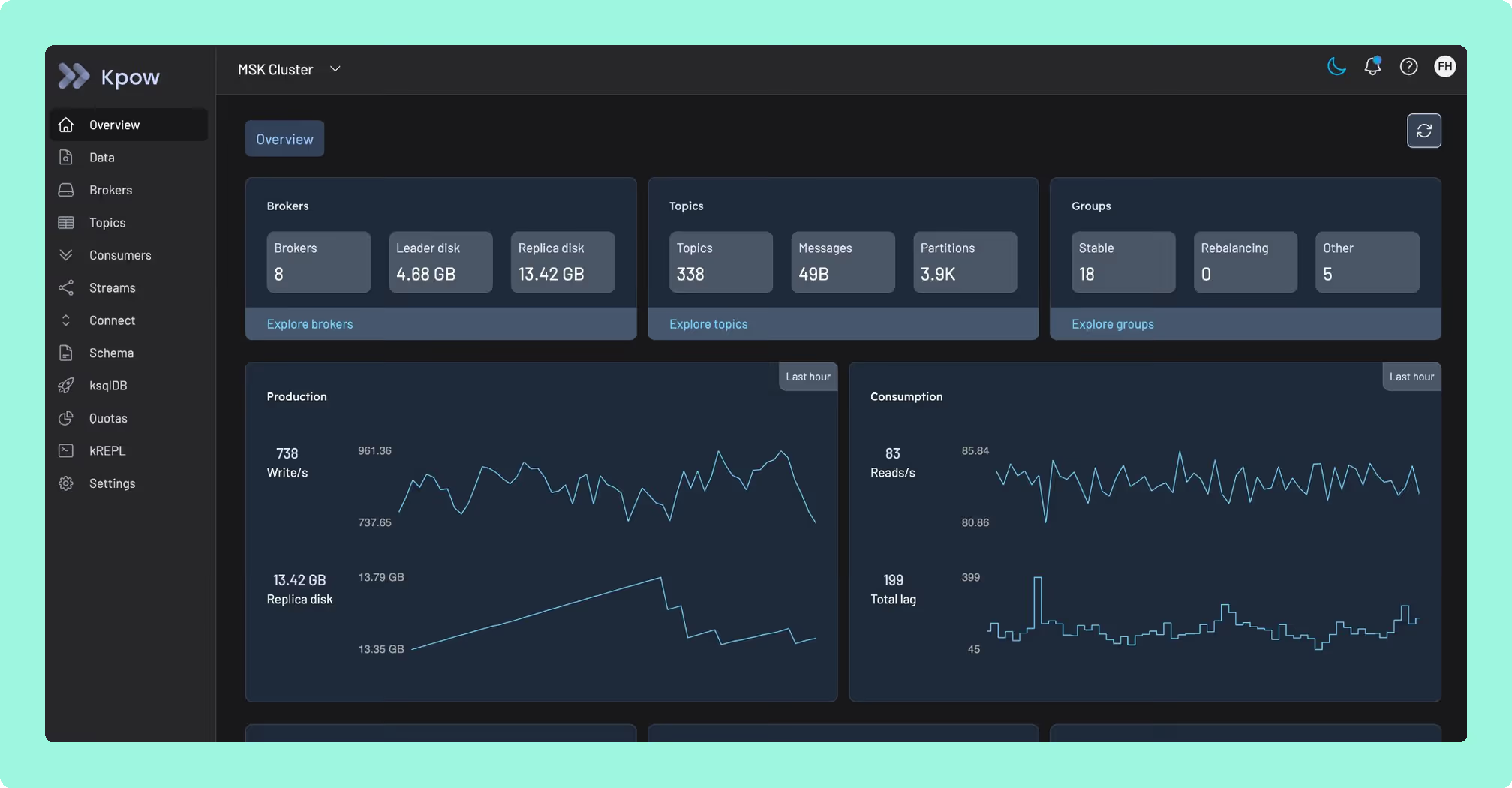
Neither AKHQ nor Kadeck prices the thing a platform team is actually running. AKHQ takes its cost out of your engineers’ time instead of a bill, and Kadeck’s governed edition starts at a ten-user minimum whether or not the team has ten people, so five engineers pay for ten seats before anyone touches masking or an audit log. Kpow by Factor House is licensed per cluster instead, from 4,500 US dollars a cluster with 100 users included: one stateless container, no external database, and up to 12 clusters from one instance. The number does not move when five people become fifty.
That’s the math worth running before the team grows into it. Try it against your own five-person team and see what the number does when it becomes fifty.
How these tools were scored
Every option is scored from 0 to 10 on each criterion, from the evidence and sources this page cites, and the reason for each score is on its card. Each criterion counts once, for a total out of 50. The options are listed by total.
Sources
- Apache Kafka documentation on authorization
- Apache Kafka documentation on consumer groups