Top Kafka UI tools in 2026: a practical comparison
ComparisonsThe top Kafka UI tools in 2026, by total score on this page’s weighted rubric, are Kpow (82 out of 90), Conduktor (74), Kafbat UI (60), AKHQ (57) and Redpanda Console (55), with Lenses.io and Confluent Control Center scored below. Kpow is the pick when people outside the platform group need Kafka access: role-based access, SAML and OpenID, masking applied by role and an audit log, in one container with no database. AKHQ and Kafbat UI cost nothing and fit teams where nobody has to answer for who changed what.
Managing Apache Kafka through the command line made sense when clusters were small and teams were smaller. That era is over. Modern Kafka deployments span multiple clusters, process millions of messages per second, and serve dozens of teams who need visibility into topics they don’t own. The CLI simply cannot provide the observability, governance, and operational efficiency that production environments demand.
This guide evaluates the leading Kafka UI tools against the criteria that actually matter for enterprise data engineering teams. It covers the commercial platforms, the vendor-specific options, and the open-source alternatives, with an honest assessment of where each excels and where each falls short.
At a glance
Seven options are scored here on this page's five weighted criteria, 90 points in all. The rubric is weighted: Support and maintenance counts three times, Access control and audit counts three times, and Cost as teams grow, Deployment footprint and Multi-cluster reach count once. The five listed first, of seven, each out of 90: Kpow: Enterprise Governance Without the Infrastructure Tax 82, which takes its best score on Access control and audit (10 out of 10) and its lowest on Cost as teams grow (7 out of 10), Free tier: Community Edition: 3 clusters, 10 users; Kafka UI (Kafbat fork): Modern but Fragile 60; AKHQ: Capable Open-Source, but Mind the Governance Gaps 57; Redpanda Console: Fast Viewer, Locked Governance 55, Licence: Business Source License; Lenses.io: Ambitious Scope, Mixed Execution 52.
What to Look for in a Kafka UI
Before diving into specific tools, it’s worth establishing what separates a production-grade Kafka UI from a basic message viewer. The gap between these categories has widened significantly as Kafka has moved from simple pub/sub to the central nervous system of enterprise data architectures.
Kafka distribution support matters more than most teams initially realise. Your UI needs to work with your specific flavour of Kafka, whether that’s vanilla Apache Kafka, AWS MSK with IAM authentication, Confluent Cloud, Redpanda, or Aiven. A tool that works beautifully with self-managed Kafka but can’t authenticate against MSK IAM is useless for half of modern deployments.
Governance and security have become non-negotiable. SOC 2, HIPAA, GDPR, and internal compliance frameworks require granular access controls, audit trails, and data masking. A Kafka UI is effectively a window into your organisation’s data, and treating security as an afterthought is increasingly untenable.
Multi-cluster management separates enterprise tools from development toys. Most organisations run separate clusters for development, staging, and production, often across multiple cloud providers. Switching between browser tabs or reconfiguring connections is not a sustainable workflow.
Chad Harris’s take: Kafka is designed to be multi-tenanted, highly scalable shared infrastructure, so I encourage teams to only add clusters when they really need to, for headroom or more throughput. A lot of places split clusters by governance domain, and I think that’s inefficient because governance domains change all the time: two domains you kept separate become one, and you end up with a third cluster for the combined domain. I’d look at better governance and audit controls instead. I’d rather see one cluster than 100, though in that case probably five or ten. (From his talk Things that go bump in the night: Kafka operational issues.)
Operational architecture determines your total cost of ownership. Does the tool require an external PostgreSQL database? Does it need gigabytes of heap memory? Can it run in air-gapped environments? These questions matter when your SRE team is already stretched thin.
Serialisation support is where many tools quietly fail. Kafka stores bytes; the intelligence is in the serialisation layer. Your UI needs to handle Avro, Protobuf, JSON Schema, and ideally custom serialisers for AWS Glue or proprietary formats. A tool that chokes on nested schemas or schema drift is useless in production.
Streaming ecosystem breadth is increasingly relevant as data platforms expand beyond Kafka. Teams running Kafka Streams, Kafka Connect, ksqlDB, or Apache Flink need tooling that provides visibility across their entire streaming infrastructure, not just the broker layer.
Kpow live demo
Put your Kafka UI criteria to a live test
You have the evaluation criteria. Open the Kpow demo to test the workflows behind them: inspection, consumer operations, visibility, and governed access.
A shared environment for enterprise Kafka evaluation.
Try the Kpow demoThe Tools Compared
 Rank 1
 Kpow: Enterprise Governance Without the Infrastructure Tax
82 out of 90 Total
Try Kpow in the live demo No signup needed.
- Type
- Self-hosted Kafka UI
- Deployment
- One stateless container, no database
- Free tier
- Community Edition: 3 clusters, 10 users
- Cost as teams grow
- 7 out of 10
- Deployment footprint
- 9 out of 10
- Support and maintenance ×3 weight, this criterion counts 3 times toward the total
- 9 out of 10
- Access control and audit ×3 weight, this criterion counts 3 times toward the total
- 10 out of 10
- Multi-cluster reach
- 9 out of 10
Why these scores for Kpow: Enterprise Governance Without the Infrastructure Tax
- Cost as teams grow 7 out of 10
- This page gives per-cluster pricing, with Community Edition free for 3 clusters and 10 users, and the Kpow pricing page has Enterprise from $4,500 per cluster with 100 users. The Kpow Community Edition page holds RBAC, masking and audit back from the free tier, so it sits below the free open-source tools.
- Deployment footprint 9 out of 10
- This page has it fully stateless, with state in internal Kafka topics and one container with no PostgreSQL, and the Kpow vs AKHQ comparison adds no database, sidecar or volume. Kafdrop is the lighter tool elsewhere on the site.
- Support and maintenance 9 out of 10
- The Kpow features page gives an Enterprise support SLA, and the Kpow vs CMAK comparison has it shipping continuously, with priority support on Enterprise and a community Slack on Community Edition.
- Access control and audit 10 out of 10
- This page gives server-side Data Policies masking so PII never reaches the browser, with audit of every view, offset reset and config change, and the Kpow features page adds RBAC with SAML, LDAP and OpenID. All Enterprise, and it ties Conduktor.
- Multi-cluster reach 9 out of 10
- This page gives MSK IAM, Confluent Cloud, Redpanda and Aiven from one deployment, and the Kpow multi-cluster page caps an instance at 12 clusters, so it is level with AKHQ, Kafbat UI and Conduktor rather than above them.
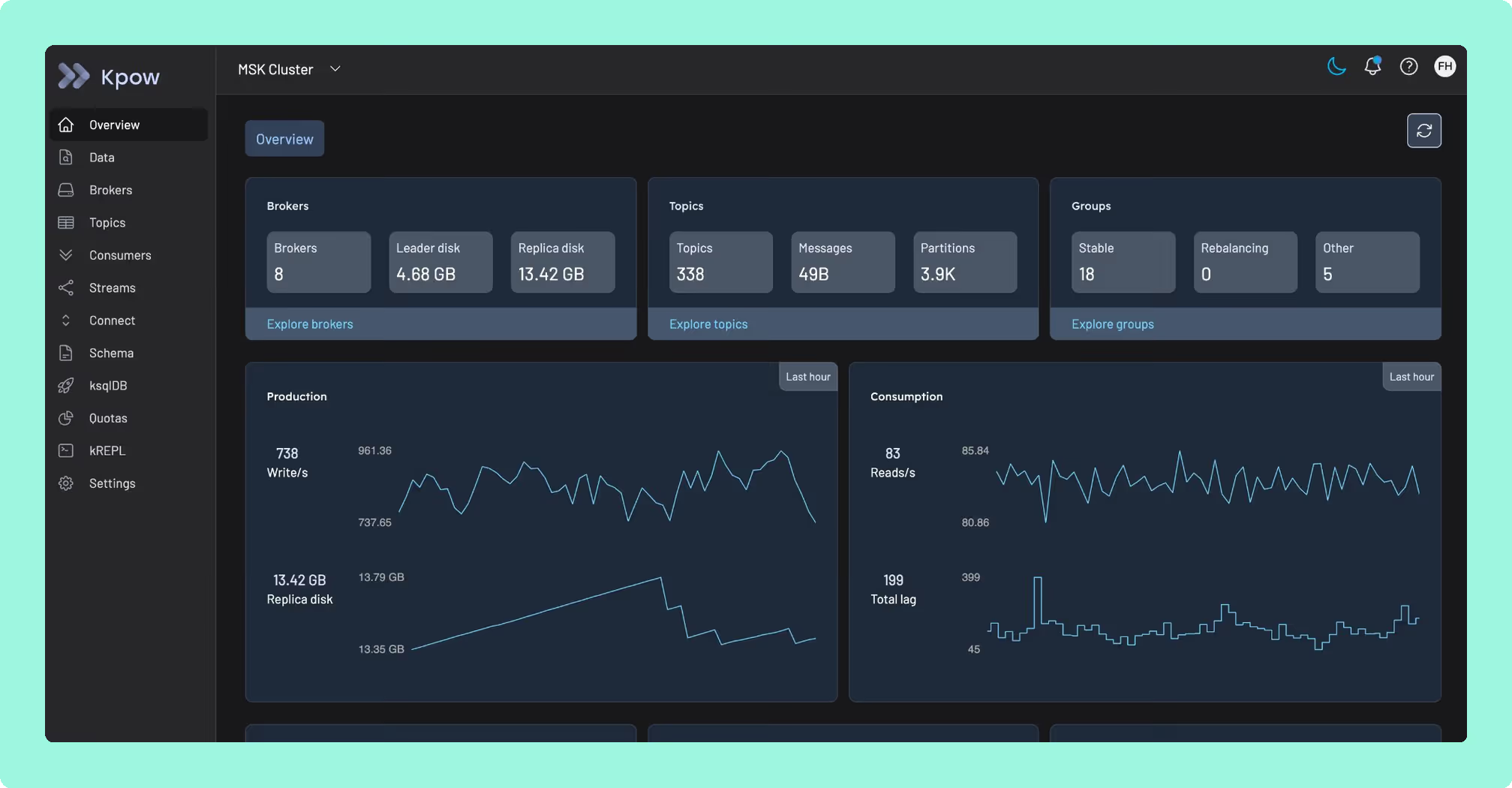
Kpow was purpose-built for a problem most Kafka UIs ignore: delivering enterprise-grade governance and observability without introducing operational complexity that rivals the clusters you’re trying to manage.
The answer is architectural. Kpow is fully stateless. It stores all state in internal Kafka topics using Kafka Streams, which means it deploys as a single container with zero external dependencies. No PostgreSQL to maintain. No separate data store to back up, patch, and monitor. No data ever leaves your network control. For regulated industries, this simplicity translates directly into faster procurement and fewer moving parts for your security team to evaluate.
This architectural simplicity belies serious depth. Kpow’s Data Policies provide server-side masking of sensitive fields based on key names or patterns, ensuring PII never reaches the browser. This satisfies PCI-DSS and HIPAA requirements without the complexity of a proxy layer sitting in front of your brokers. Comprehensive audit logging captures every action: who viewed what data, who reset which offset, who changed which configuration, with optional Slack integration for ChatOps transparency.
Where Kpow genuinely pulls ahead of every other tool on this list is Kafka distribution compatibility. It offers native AWS MSK IAM authentication (not a workaround via SASL, but actual IAM integration), Confluent Cloud, Redpanda, Aiven, and AWS Glue Schema Registry support, all from a single deployment. If you’re running a multi-cloud or hybrid Kafka environment, and increasingly most enterprises are, Kpow provides a unified view across every cluster and every distribution without per-instance configuration.
Kpow’s kJQ filtering deserves specific attention. It provides JQ-based predicates for searching deeply nested data structures server-side. When you’re debugging a production issue at 2am, the ability to write precise queries against complex message payloads without writing disposable consumer code is a material operational advantage.
Teams can get started by trying Kpow Enterprise for free. There is transparent per-cluster pricing rather than per-user models that penalise growing teams. A free Community Edition is available for up to 3 clusters and 10 users.
Best for: Any team where Kafka is production infrastructure that must be governed, audited, and operated reliably, particularly in regulated industries, multi-cluster environments, or organisations where operational simplicity and vendor independence are strategic priorities.
Staying patched. Kpow’s release notes name the CVEs each release remediates, and the 96.4 image built on 5 August 2026 bundles 311 dependencies. What a licence buys here is not a different deployment model, because Kpow is self-hosted too. It is a company contracted to ship the fix. Every dependency figure on this page was read on 24 September 2026 from the published artefacts and from nvd.nist.gov.
Compare Kpow vs AKHQKpow vs Kafbat UIKpow vs Redpanda ConsoleKpow vs Confluent Control CenterKpow vs Lenses.io
 Rank 2
 Kafka UI (Kafbat fork): Modern but Fragile
60 out of 90 Total
- Forked from
- provectus/kafka-ui
- Access control
- Basic RBAC via YAML
- Support
- Community, no SLA
- Cost as teams grow
- 10 out of 10
- Deployment footprint
- 8 out of 10
- Support and maintenance ×3 weight, this criterion counts 3 times toward the total
- 5 out of 10
- Access control and audit ×3 weight, this criterion counts 3 times toward the total
- 6 out of 10
- Multi-cluster reach
- 9 out of 10
Why these scores for Kafka UI (Kafbat fork): Modern but Fragile
- Cost as teams grow 10 out of 10
- This page makes it the pick where budget is the primary constraint, and the Kadeck vs Kafbat UI comparison has Apache 2.0 with no seat or cluster cap and nothing held back.
- Deployment footprint 8 out of 10
- The Kadeck vs Kafbat UI comparison gives a stateless container with a published Helm chart, and the Kpow vs Kafbat UI comparison adds a mounted volume only if the configuration wizard is used.
- Support and maintenance 5 out of 10
- This page gives no SLA and a bug backlog inherited from Provectus, and the AKHQ vs Kafbat UI comparison has v1.5.0 in April 2026 with commits in August 2026, and professional services quoted but no SLA.
- Access control and audit 6 out of 10
- This page gives basic RBAC via YAML and regex masking, and the Kafbat UI vs Lenses comparison has server-side REMOVE, REPLACE and MASK policies with audit to a Kafka topic, but no per-role masking or in-product audit view.
- Multi-cluster reach 9 out of 10
- This page gives multi-cluster management, with a Yes in its matrix on MSK (Glue SerDe), Confluent Cloud and Redpanda, and the Conduktor vs Kafbat UI comparison makes another cluster another config entry, with no cap.
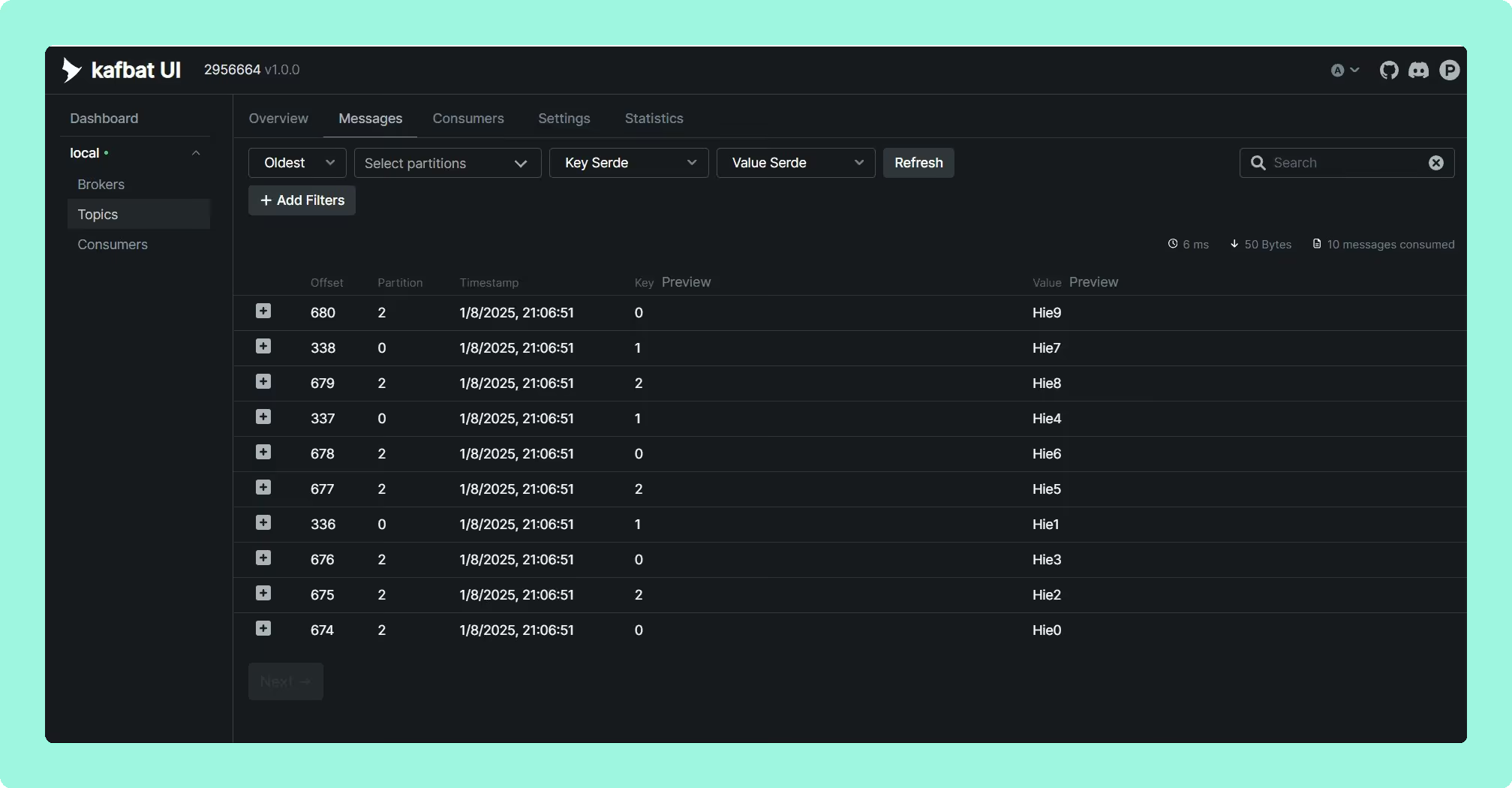
A critical warning first: if you’re still running the original provectuslabs/kafka-ui Docker image, you’re running abandoned software with known security vulnerabilities. The project was effectively unmaintained from late 2023, with a remote code execution vulnerability (CVE-2023-52251) taking six months to patch. The core maintainers forked the project to kafbat/kafka-ui, which is where active development continues.
The Kafbat fork offers the most approachable open-source interface, with multi-cluster management, Kafka Connect integration, and Avro/Protobuf/JSON support. It includes basic RBAC via YAML configuration and data masking with regex support.
The fundamental trade-off is sustainability. This is a community-maintained fork of an abandoned project. There’s no vendor to call during an incident, no SLA, and long-term development direction depends entirely on volunteer contributor interest. The project inherited a significant bug backlog from Provectus, and while the Kafbat team has been responsive, the provectus/kafka-ui abandonment is a cautionary tale about relying on open-source projects without commercial backing for production infrastructure tooling.
Best for: Startups and development environments where budget is the primary constraint and the team has capacity to manage configuration, maintenance, and the risk of project abandonment.
Staying patched. Kafbat UI released v1.5.0 in April 2026 and has not shipped since. In the 157 days since, at least 20 high or critical advisories have been published against libraries that release bundles, including the netty critical CVE-2026-75595. Only 150 of its 266 bundled jars resolved to a Maven coordinate, so that count is a floor and the state of the release itself is unmeasured. Kafbat does publish a security policy, which AKHQ and Kafdrop do not, and the one CVE filed against its own code, CVE-2025-49127, was already fixed in the release that preceded the advisory. Six releases in two years.
Compare Kpow vs Kafbat UIAKHQ vs Kafbat UIConduktor vs Kafbat UIKafbat UI review
 Rank 3
 AKHQ: Capable Open-Source, but Mind the Governance Gaps
57 out of 90 Total
- Built on
- Micronaut
- Configuration
- YAML and Helm charts
- SSO
- LDAP, OAuth2/OIDC, GitHub
- Cost as teams grow
- 10 out of 10
- Deployment footprint
- 8 out of 10
- Support and maintenance ×3 weight, this criterion counts 3 times toward the total
- 5 out of 10
- Access control and audit ×3 weight, this criterion counts 3 times toward the total
- 5 out of 10
- Multi-cluster reach
- 9 out of 10
Why these scores for AKHQ: Capable Open-Source, but Mind the Governance Gaps
- Cost as teams grow 10 out of 10
- This page calls it “the most proven free option”, and the Kpow vs AKHQ comparison has Apache 2.0 with the whole product free and no paid tier, so adding an engineer changes nothing.
- Deployment footprint 8 out of 10
- This page gives configuration-as-code in YAML with Helm, and the AKHQ vs Kadeck comparison has one JVM container with no database or sidecar. It is docked for the page’s “responsiveness issues under load” and the open memory-growth reports.
- Support and maintenance 5 out of 10
- This page has load issues acknowledged by the maintainer but not fully resolved, and the AKHQ vs Kafbat UI comparison has three releases in eight months from one maintainer, with GitHub issues only and no SLA.
- Access control and audit 5 out of 10
- This page gives LDAP, OIDC and GitHub SSO with regex topic filtering, but masking is a global policy rather than a role-aware one and audit is opt-in to a Kafka topic, not shown in the tool.
- Multi-cluster reach 9 out of 10
- This page’s matrix gives MSK IAM auth, Confluent Cloud via SASL, Redpanda and multi-cluster as Yes, and the Kpow vs AKHQ comparison has one deployment reaching one cluster or many.
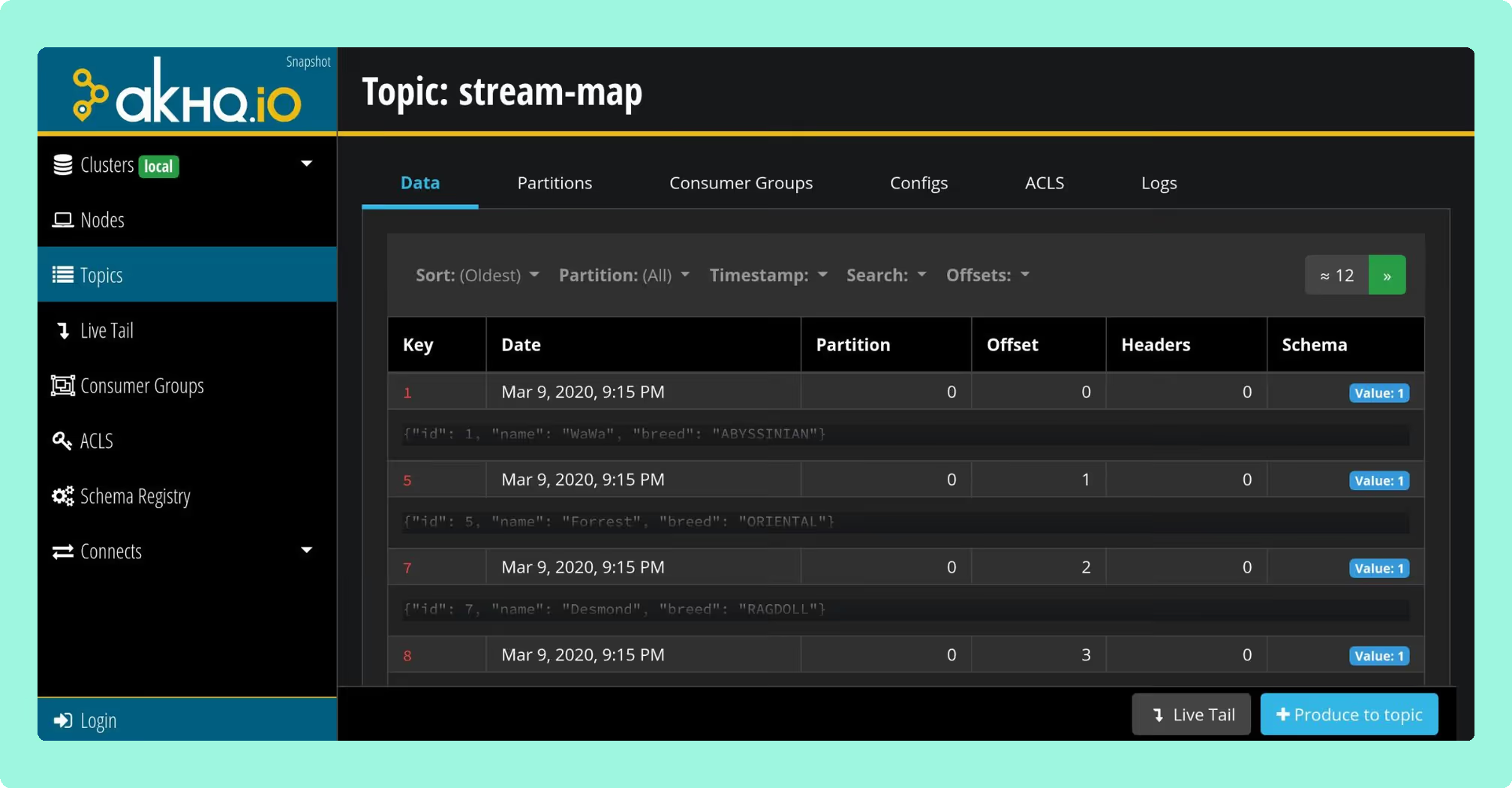
AKHQ (formerly KafkaHQ) is the most established open-source Kafka UI option. It’s built on Micronaut and designed for configuration-as-code deployments.
AKHQ’s strength is its GitOps-native architecture. Connections, users, groups, and schema registry links can all be defined in YAML, making it straightforward to deploy consistently across environments using Helm charts. It supports LDAP, OAuth2/OIDC, and GitHub SSO, with regex-based topic filtering for access control.
The limitations become apparent at enterprise scale. AKHQ’s data masking is a global policy rather than a role-aware one, configured in application YAML by topic and field path with one filter per topic, so what is hidden does not vary by who is looking. For a team handling PII or operating under HIPAA, PCI-DSS, or GDPR requirements, that is the gap to size. Audit logging exists, is opt-in, and is produced to a Kafka topic you nominate rather than shown as activity tracking inside the tool. The UI has also received persistent criticism for responsiveness issues under load, which the maintainer has acknowledged but not fully resolved. For development and staging environments these gaps may be acceptable; for production governance, they leave real exposure.
Best for: Mid-size organisations with strong DevOps cultures who need proven open-source tooling and can accept the governance limitations, or as a complement to a commercial tool for non-production environments.
Staying patched. AKHQ has no CVE filed against its own code, and that is the wrong number to plan against. Release 0.28.0, cut on 6 August 2026, bundles 270 libraries and 18 of them carry a high or critical advisory. Sixteen were already public, with fixed versions already on Maven Central, on the day it shipped, and five are netty advisories Kpow had remediated three weeks earlier in 96.2: CVE-2026-44249, CVE-2026-45416, CVE-2026-45674, CVE-2026-47691 and CVE-2026-50010. The oldest has been open 108 days. That is exposure and remediation latency rather than a working attack, and every figure resolves against the published jar and nvd.nist.gov. Four releases in two years, and no security policy at any path GitHub reads.
 Rank 4
 Redpanda Console: Fast Viewer, Locked Governance
redpanda.com
55 out of 90 Total
- Written in
- Go
- Licence
- Business Source License
- Governance
- Needs a Redpanda Enterprise licence
- Cost as teams grow
- 6 out of 10
- Deployment footprint
- 8 out of 10
- Support and maintenance ×3 weight, this criterion counts 3 times toward the total
- 7 out of 10
- Access control and audit ×3 weight, this criterion counts 3 times toward the total
- 6 out of 10
- Multi-cluster reach
- 2 out of 10
Why these scores for Redpanda Console: Fast Viewer, Locked Governance
- Cost as teams grow 6 out of 10
- This page has the viewer free under the Business Source License, but SSO, RBAC and masking need a paid Redpanda Enterprise licence even on clusters that are not Redpanda.
- Deployment footprint 8 out of 10
- This page has it written in Go, with a minimal memory footprint and near-instant startup, and the Kadeck vs Redpanda Console comparison has a stateless container plus an external Schema Registry.
- Support and maintenance 7 out of 10
- The Kafbat UI vs Redpanda Console comparison has v3.11.0 on 25 August 2026, and the AKHQ vs Redpanda Console comparison gives vendor support under a Redpanda contract where licensed and the public tracker otherwise.
- Access control and audit 6 out of 10
- This page has SSO, RBAC and data masking all licence-gated, and the AKHQ vs Redpanda Console comparison has audit as a Redpanda platform capability, not a Console one.
- Multi-cluster reach 2 out of 10
- This page says “Multi-cluster support is also limited” and its matrix gives Limited, and the Kafdrop vs Redpanda Console comparison has one broker cluster per deployment on any licence.
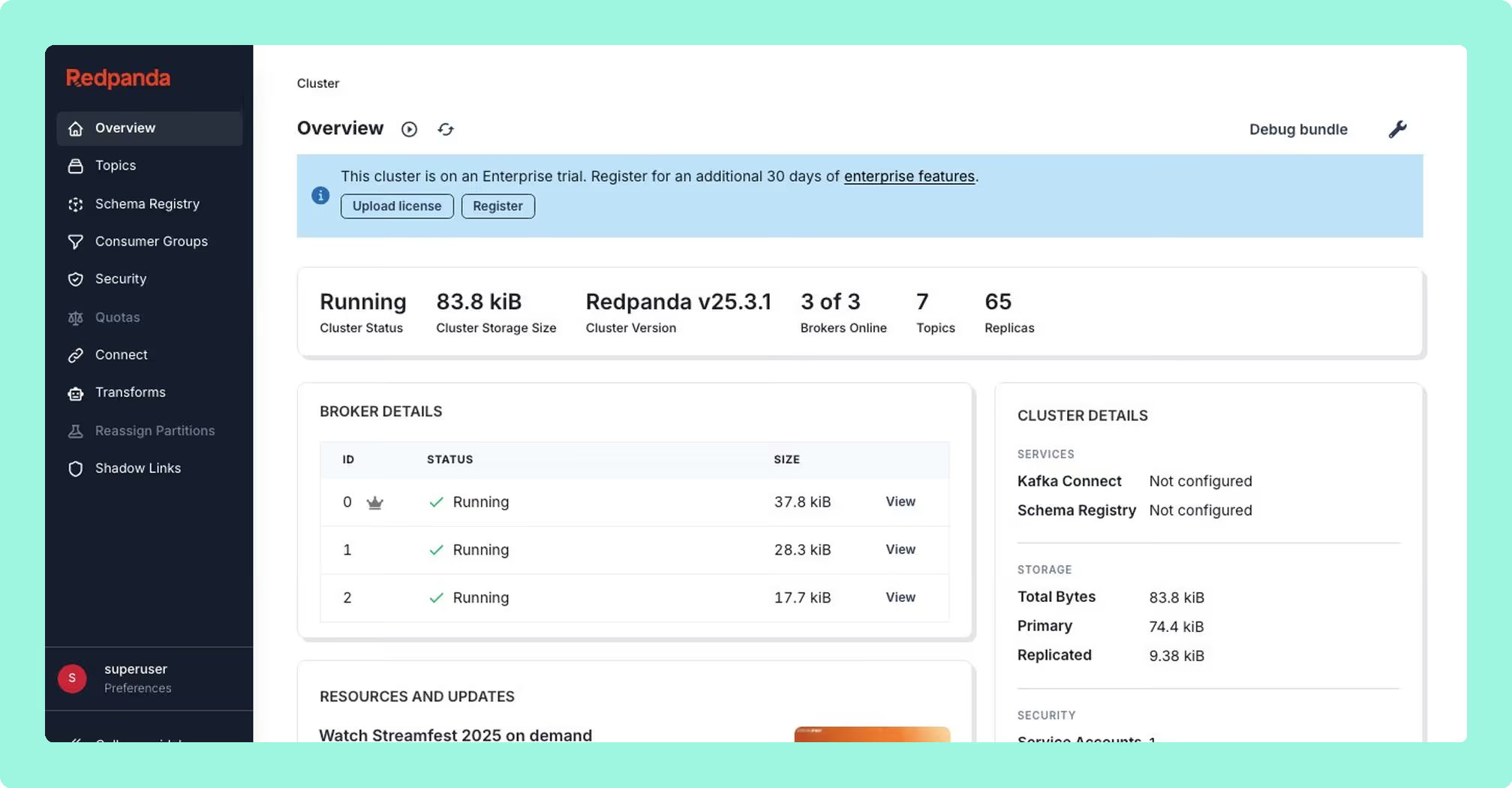
Originally built as Kowl by CloudHut before Redpanda’s acquisition, Redpanda Console performs well as a message viewer. Written in Go, it delivers minimal memory footprint and near-instant startup, which is a meaningful advantage for developers running local stacks. Its automatic deserialisation heuristics for Protobuf, Avro, MessagePack, and JSON are solid.
The catch is the licensing model. The core viewer is free under a Business Source License, but every enterprise feature that matters (SSO, RBAC, data masking) requires a paid Redpanda Enterprise license. This creates a problematic dynamic for vanilla Apache Kafka or MSK users: you can use the viewer for free, but the moment you need governance, you’re paying for a Redpanda license even if you don’t run Redpanda. Without those enterprise features, it’s a browser for messages, not an operational tool.
Multi-cluster support is also limited compared to dedicated multi-cluster solutions, and MSK IAM authentication requires SASL workarounds rather than native integration.
Best for: Local development and debugging where you need a fast, lightweight message viewer. Not a realistic option for production governance unless you’re already a Redpanda customer.
Compare Kpow vs Redpanda ConsoleConduktor vs Redpanda ConsoleRedpanda Console review
 Rank 5
 Lenses.io: Ambitious Scope, Mixed Execution
lenses.io
52 out of 90 Total
- Query layer
- Proprietary SQL engine
- Transformations
- SQL Processors on Kubernetes
- Discovery
- Data catalog and lineage
- Cost as teams grow
- 4 out of 10
- Deployment footprint
- 2 out of 10
- Support and maintenance ×3 weight, this criterion counts 3 times toward the total
- 6 out of 10
- Access control and audit ×3 weight, this criterion counts 3 times toward the total
- 7 out of 10
- Multi-cluster reach
- 7 out of 10
Why these scores for Lenses.io: Ambitious Scope, Mixed Execution
- Cost as teams grow 4 out of 10
- This page gives “a different price point” set by DataOps positioning, and the Kpow vs Lenses comparison has Team from $4,000 a year for 15 users, with a user cap at each rung and custom above that.
- Deployment footprint 2 out of 10
- This page reports deployment complexity, especially air-gapped, and the Kafdrop vs Lenses comparison has HQ on PostgreSQL plus an Agent and an Agent database per cluster, free tier included.
- Support and maintenance 6 out of 10
- This page records G2 and forum concerns about roadmap velocity and unresolved bugs, and the AKHQ vs Lenses comparison has a vendor support contract from Team.
- Access control and audit 7 out of 10
- The AKHQ vs Lenses comparison gives in-product audit logs, SSO, SAML and RBAC from Team, with masking global by field name and not varying by role.
- Multi-cluster reach 7 out of 10
- This page gives catalog and lineage across multi-cluster environments, with Global catalog in its matrix, and the Conduktor vs Lenses comparison has one Agent per cluster and federated multi-Kafka only at the custom top tier.
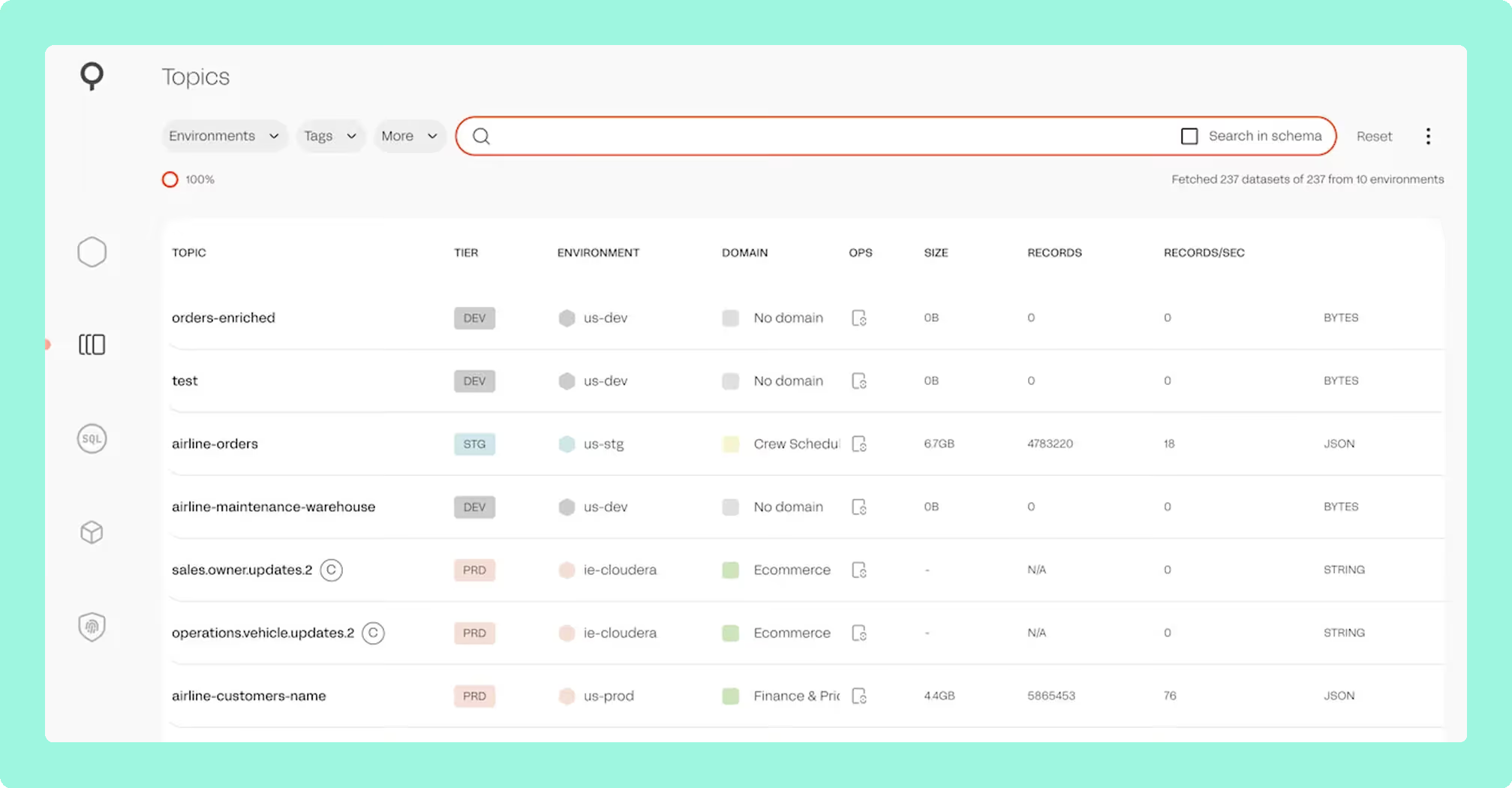
Lenses positions itself as a DataOps platform rather than a pure Kafka UI, with a proprietary SQL engine that lets users query and transform streaming data using SQL syntax. The SQL interface may appeal to business analyst roles or less technical team members who need access to Kafka data without writing Java or Scala consumer code. SQL Processors allow deploying continuous transformations to Kubernetes, though this introduces a proprietary abstraction layer over your streaming infrastructure.
The data catalog and lineage tracking provide searchable topic discovery and data flow visualisation across multi-cluster environments.
However, Lenses occupies a different price point that reflects its broader DataOps positioning, which may be difficult to justify if your primary need is Kafka observability and governance. Some users report deployment complexity, particularly in air-gapped environments. The SQL abstraction introduces a proprietary layer that creates its own form of lock-in. And recent user feedback on G2 and community forums has flagged concerns about product roadmap velocity and unresolved bugs across releases, which are signals worth monitoring when evaluating long-term investment.
Best for: Organisations where SQL-based streaming data access is a primary requirement, particularly for business analysts or less technical roles who need self-service Kafka access. Evaluate carefully if your core need is operational governance rather than data exploration.
Compare Kpow vs Lenses.ioConduktor vs LensesLenses.io review
Confluent Control Center: Powerful but Captive
confluent.io
46 out of 90 Total
- Ships with
- Confluent Platform licensing
- Broker requirement
- Confluent Metrics Reporter JAR
- Distinct strength
- Kafka Streams and ksqlDB views
- Cost as teams grow
- 2 out of 10
- Deployment footprint
- 2 out of 10
- Support and maintenance ×3 weight, this criterion counts 3 times toward the total
- 6 out of 10
- Access control and audit ×3 weight, this criterion counts 3 times toward the total
- 7 out of 10
- Multi-cluster reach
- 3 out of 10
Why these scores for Confluent Control Center: Powerful but Captive
- Cost as teams grow 2 out of 10
- This page has it bundled with Confluent Platform licensing, so the UI is never priced alone, and the Kpow vs Confluent Control Center comparison has no published price and no free tier beyond an evaluation.
- Deployment footprint 2 out of 10
- This page puts the Metrics Reporter JAR in every broker classpath, with some deployments needing as much compute as the brokers, and the pair pages give dedicated nodes from 4 cores, 8 GB and 200 GB.
- Support and maintenance 6 out of 10
- The AKHQ vs Confluent Control Center comparison gives Confluent support under an enterprise contract, with quarterly patches for the current version only, and legacy to next generation is a migration.
- Access control and audit 7 out of 10
- The CMAK vs Confluent Control Center comparison gives RBAC with audit logging of authentication and authorisation events, with OIDC only on self-managed, no SAML, and no masking described.
- Multi-cluster reach 3 out of 10
- This page’s matrix has no native MSK IAM, no Redpanda and self-managed only with Confluent components, because the reporter JAR ties it to Confluent Platform clusters.
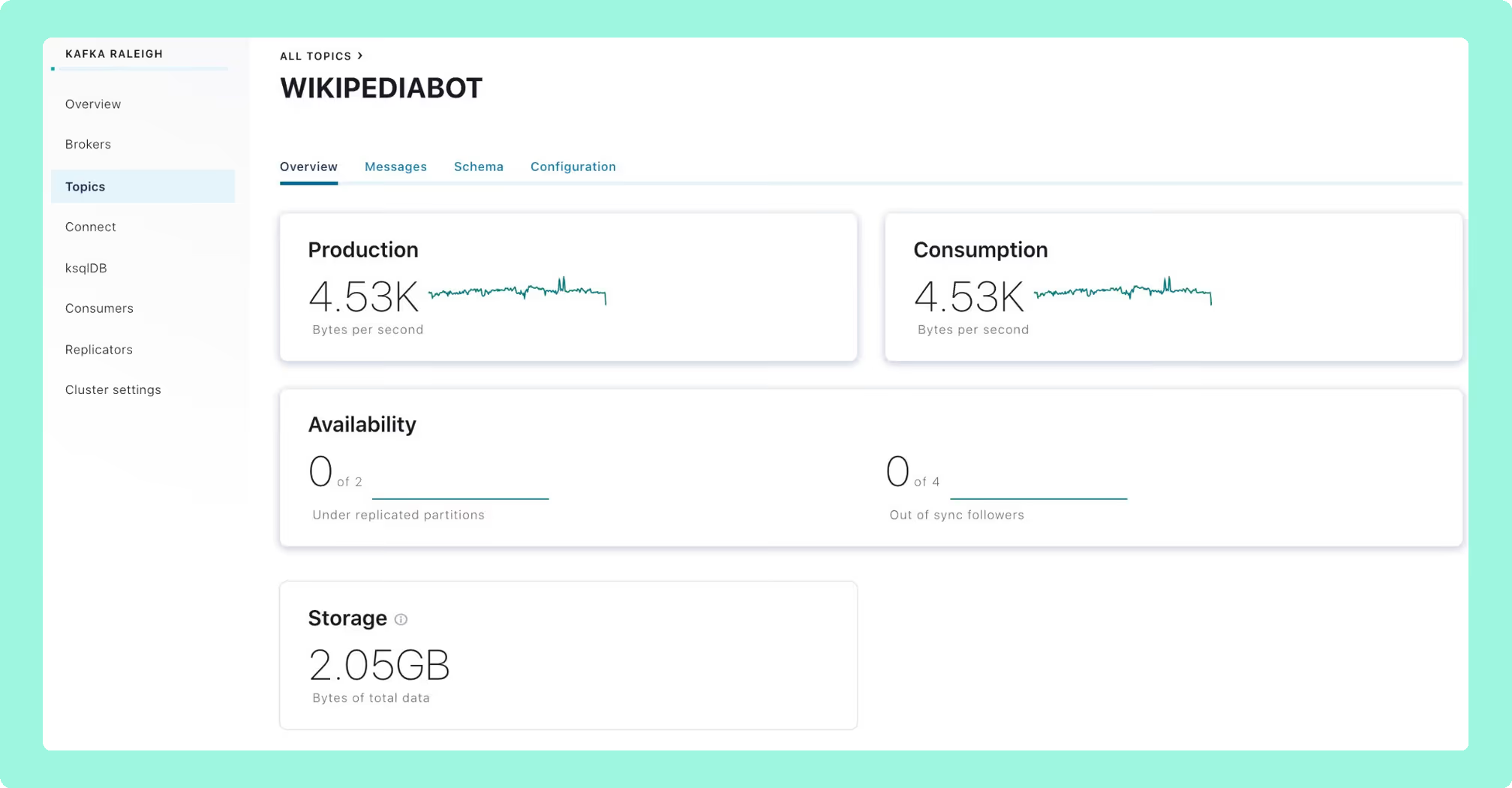
Confluent Control Center provides the deepest integration for Confluent Platform users. Kafka Streams topology visualisation, ksqlDB development, and Replicator monitoring are tightly coupled to the Confluent ecosystem in ways that third-party tools have not replicated. If you’re fully committed to the Confluent ecosystem, it provides native observability across the platform.
The critical limitation is that commitment must be total. Control Center requires the Confluent Metrics Reporter JAR installed in broker classpaths and effectively mandates the Confluent ecosystem for full functionality. It cannot work with AWS MSK’s native IAM authentication, immediately disqualifying it for the growing number of organisations using MSK. It also doesn’t support Redpanda or Aiven deployments.
The resource footprint is substantial, with some deployments requiring as much compute as the Kafka brokers themselves. And because Control Center is bundled with Confluent Platform licensing, you’re not evaluating the UI in isolation; you’re evaluating an entire ecosystem commitment.
Best for: Organisations already fully committed to Confluent Platform who specifically need Kafka Streams and ksqlDB visualisation. Not viable, and not intended, for vanilla Apache Kafka, AWS MSK, or multi-vendor environments.
Compare Kpow vs Confluent Control CenterConduktor vs Confluent Control CenterConfluent Control Center review
 Rank 7
 Conduktor: Broad Feature Set, Operationally Heavy
conduktor.io
74 out of 90 Total
- Dependency
- External PostgreSQL
- Pricing
- Per user, tiered features
- Proxy
- Gateway: encryption, masking, policy
- Cost as teams grow
- 5 out of 10
- Deployment footprint
- 3 out of 10
- Support and maintenance ×3 weight, this criterion counts 3 times toward the total
- 9 out of 10
- Access control and audit ×3 weight, this criterion counts 3 times toward the total
- 10 out of 10
- Multi-cluster reach
- 9 out of 10
Why these scores for Conduktor: Broad Feature Set, Operationally Heavy
- Cost as teams grow 5 out of 10
- This page gives per-user pricing that scales with team size, and the Conduktor vs Lenses comparison has Team Edition at $1,200 per seat per year, with Community free for 50 users and 3 clusters.
- Deployment footprint 3 out of 10
- This page has Console requiring an external PostgreSQL database, and the Conduktor vs Kafdrop comparison has PostgreSQL 13+ plus sized Console and Gateway nodes, with Gateway in the data path.
- Support and maintenance 9 out of 10
- The Conduktor vs Kafdrop comparison gives vendor support under contract and SOC2 Type II since 2023, and the CMAK vs Conduktor comparison has it shipping continuously.
- Access control and audit 10 out of 10
- This page gives RBAC with wildcard patterns, compliance-ready audit logging with SIEM integration, and Gateway field-level encryption and masking. It ties Kpow.
- Multi-cluster reach 9 out of 10
- Conduktor vs Redpanda Console and Conduktor vs Lenses: several clusters from one Console, unlimited on Team Edition; this page’s matrix cell corrected from “Per-instance”.
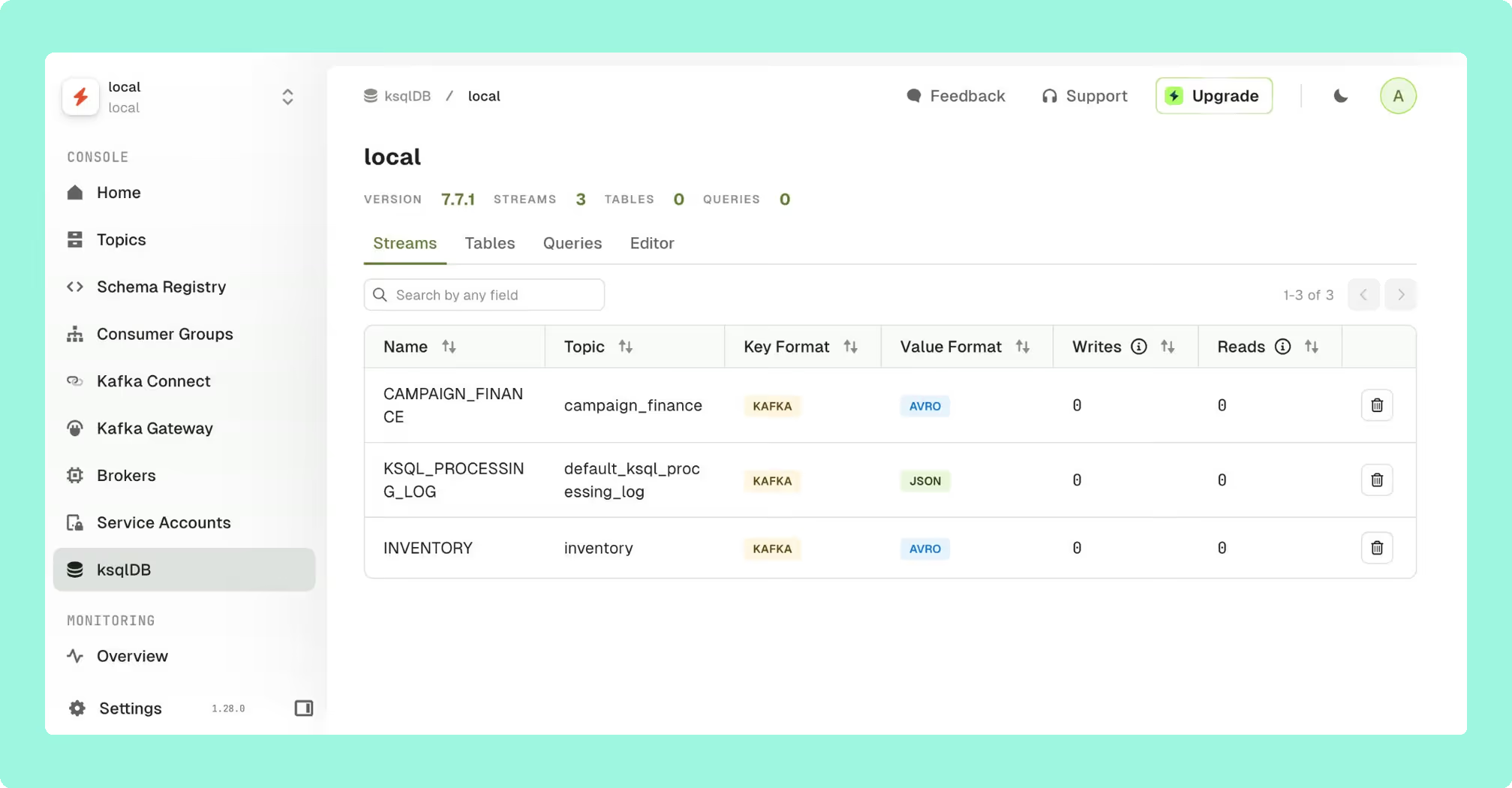
Conduktor has evolved from a desktop application into a web platform targeting enterprise data quality and governance. Its headline feature is the Gateway proxy architecture, a Kafka proxy layer that enables field-level encryption, data masking, and policy enforcement at the wire level without modifying producer applications.
The platform offers RBAC with wildcard patterns, compliance-ready audit logging with SIEM integration, and data quality validation rules that catch schema violations before bad data pollutes topics.
The operational cost is significant and should be evaluated carefully. Conduktor Console requires an external PostgreSQL database, adding another stateful dependency to provision, back up, patch, monitor, and secure. This stands in stark contrast to stateless architectures that deploy as a single container. The licensing model includes per-user pricing and tiered feature access, which means the cost scales with team size in ways that per-cluster pricing does not. For large platform teams, this distinction can be material.
Best for: Enterprises that specifically need wire-level proxy capabilities for encryption or policy enforcement, and have the operational capacity to manage the additional infrastructure dependencies.
Compare Conduktor vs LensesConduktor vs Redpanda ConsoleConduktor vs Kafbat UIConduktor review
Platform Compatibility Matrix
Enterprise deployments typically span multiple Kafka flavours. This compatibility matrix reflects verified documentation as of early 2026:
| Rank | Tool | AWS MSK (IAM) | Confluent Cloud | Redpanda | Self-Managed | Multi-Cluster |
|---|---|---|---|---|---|---|
| 1 | Kpow | Native | Full | Yes | Yes | Unified view |
| 2 | Kafka UI (Kafbat) | Glue SerDe | Yes | Yes | Yes | Yes |
| 3 | AKHQ | IAM Auth | Via SASL | Yes | Yes | Yes |
| 4 | Redpanda Console | Via SASL | Via SASL | Native | Yes | Limited |
| 5 | Lenses | Yes | Yes | Yes | Yes | Global catalog |
| 6 | Confluent CC | No native support | Native | No | Requires components | Yes |
| 7 | Conduktor | Deep integration | Deep integration | Yes | Yes | Several per Console |
The absence of native AWS MSK IAM support in Confluent Control Center is a significant limitation for the growing number of organisations using MSK as their primary Kafka deployment.
Kpow is the only tool on this list that provides native integration with every major Kafka distribution, including AWS MSK IAM, Confluent Cloud, Redpanda, Aiven, and AWS Glue Schema Registry, from a single, stateless deployment. For organisations running heterogeneous Kafka environments, this eliminates the need for distribution-specific workarounds or multiple tool instances.
Why Factor House built Kpow
Factor House builds tooling for streaming data platforms. It started with Kpow because it saw a clear gap: existing Kafka UIs either required complex infrastructure to deliver governance, or treated governance as an afterthought to keep things simple. Its thesis was that these shouldn’t be mutually exclusive, and the adoption by teams at organisations like Binance and NORD/LB has validated that approach.
The streaming ecosystem is expanding beyond Kafka. Teams now run Kafka alongside Kafka Connect, Kafka Streams, and increasingly Apache Flink. Factor House believes tooling should evolve with this reality rather than remaining siloed. Factor House’s roadmap extends Kpow’s operational model (stateless deployment, transparent pricing, compliance-first design) across the streaming stack with products like Flex for Apache Flink and Factor Platform.
Kpow delivers the deepest combination of Kafka governance, distribution compatibility, and operational simplicity available, without the infrastructure overhead, vendor lock-in, or per-user pricing that comes with the alternatives.
Choosing the Right Tool for Your Team
For AWS MSK-primary environments: Kpow provides native IAM authentication with zero workarounds, making it the cleanest MSK integration available. Conduktor also offers strong MSK support but requires PostgreSQL infrastructure. AKHQ is the best free alternative with MSK IAM support, though its data masking is a global policy rather than a role-aware one.
For Confluent Platform shops: Use Confluent Control Center if you specifically need Kafka Streams topology and ksqlDB visualisation. For broader observability, governance, and multi-cluster management, Kpow delivers comparable or better capabilities without the ecosystem lock-in or resource overhead.
For multi-cloud or hybrid deployments: Kpow is the clear choice, offering the only truly unified multi-cluster view across every major Kafka distribution with transparent per-cluster pricing. No other tool matches this breadth from a single deployment.
For compliance-heavy enterprises: Kpow’s stateless architecture means no external database storing sensitive metadata, server-side data masking ensures PII never reaches browsers, and comprehensive audit logging satisfies SOC 2 and HIPAA requirements. Conduktor’s Gateway adds wire-level encryption if you need proxy capabilities, but evaluate whether that complexity is justified for your use case.
For cost-conscious teams: AKHQ offers the most proven free option with broad enterprise adoption. Kafbat provides a more modern UI but carries project sustainability risk. Kpow’s Community Edition is free for up to 3 clusters and 10 users, with RBAC, data masking and audit logging reserved for Enterprise, which is worth evaluating before committing to open-source maintenance overhead. For a full breakdown of every free tier’s limits, features, and upgrade costs, including Conduktor and Lenses, see the best free Kafka UI tools comparison.
For development and testing: Kpow Community Edition is free for up to 3 clusters and 10 users, with full topic search, consumer group and offset management, and schema registry and Kafka Connect management; RBAC, data masking and audit logging are Enterprise features. Redpanda Console and Kafbat are also solid options for local development.
Conclusion
The Kafka UI you choose has real consequences for your team’s operational efficiency, compliance posture, and long-term flexibility. The right decision depends on matching your tool to your actual constraints: regulatory requirements, Kafka distribution, deployment complexity, and team capacity.
Open-source tools have matured. AKHQ and Kafbat are production-viable for many organisations, though both carry governance limitations that matter at enterprise scale. The provectus/kafka-ui abandonment is a useful reminder that project health matters as much as feature sets.
For enterprises where governance isn’t optional, the commercial landscape offers clear trade-offs. Conduktor adds proxy capabilities at the cost of infrastructure complexity. Lenses provides SQL abstraction at a DataOps price point. Confluent Control Center delivers deep platform integration but demands total ecosystem commitment. Kpow provides the broadest Kafka distribution support, the simplest operational footprint, and the deepest compliance capabilities, without requiring external databases, vendor lock-in, or per-user pricing.
If Kafka is critical infrastructure for your organisation, start with a free trial of Kpow and see the difference for yourself.
For the rest of the tooling landscape, see the complete guide to Kafka.
How these tools were scored
Every option is scored from 0 to 10 on each criterion, from the evidence and sources this page cites, and the reason for each score is on its card. The criteria are weighted: Cost as teams grow counts once, Deployment footprint counts once, Support and maintenance counts three times, Access control and audit counts three times and Multi-cluster reach counts once, for a total out of 90. Access control and audit and Support and maintenance count three times here, because in a regulated environment the decisive questions are who may act on a cluster and who is accountable when a dependency advisory lands. Cost as teams grow, deployment footprint and multi-cluster reach are real, but they are one-off decisions rather than standing exposure, so they count once. This page is published by Factor House, which makes Kpow: Enterprise Governance Without the Infrastructure Tax. Every option is scored on the same rubric and the same sources: Kpow: Enterprise Governance Without the Infrastructure Tax's per-criterion scores are set the same way as every other option's and are not adjusted, and the weights apply to every option alike. Kpow: Enterprise Governance Without the Infrastructure Tax ranks first on its total of 82 out of 90. The other options follow by total. Conduktor: Broad Feature Set, Operationally Heavy is listed last whatever its total; on its total of 74 it would place second.