Best tools to manage a dead letter queue in Kafka
ComparisonsKafka dead letter queue tools cover two jobs: writing failed records to the DLQ (Kafka Connect’s errors.deadletterqueue settings, Spring Kafka’s DeadLetterPublishingRecoverer, Kafka Streams exception handlers), and working the DLQ afterwards (the Kafka CLI and kcat, a custom replay consumer, and UIs such as Kpow, AKHQ, Kafbat UI and Conduktor Console).
Creating a DLQ is the well-documented half. Inspecting, triaging, repairing and replaying what lands in it is where teams end up writing scripts at 2am, so that half gets most of the scoring here. For the wider tooling picture, see the complete Kafka guide.
At a glance
Eight options are scored here on this page's five weighted criteria, 70 points in all. The rubric is weighted: Access control and audit counts three times, and Error context on the record, Triage without a script, Repair, original kept intact and Targeted, tracked replay count once. The five listed first, of eight, each out of 70: Kpow 63, which takes its best score on Triage without a script (10 out of 10) and its lowest on Targeted, tracked replay (6 out of 10); AKHQ and Kafbat UI 40; A custom DLQ replay consumer 27; Spring Kafka DeadLetterPublishingRecoverer 19; Kafka CLI and kcat 16.
Dead letter queue tools compared
The first three rows write to a DLQ. The rest work one after it fills. Choosing where to put the DLQ in your design, rather than which tool manages it, is covered in dead letter queues in Kafka: patterns and pitfalls, which compares the Spring Kafka, Kafka Connect and Kafka Streams implementations with code.
| Rank | Tool | Job | Error context on the record | Triage | Repair | Replay | Access control and audit | Source |
|---|---|---|---|---|---|---|---|---|
| 1 | Kpow | Inspect, clone and re-produce DLQ records | Shows headers with a headers deserializer, plus schema ID metadata | Data Inspect search with kJQ filters across topics, long-lived result tabs | Send records to Data Produce, amend, produce | Clone to topic, byte for byte, for one record or a whole result set | RBAC per clone source and sink, bulk clone behind its own permission, audit log | Kpow docs |
| 2 | AKHQ | Browse and produce | Record view in the UI, so it shows what the writer put there | Search and live tail in the UI | Produce an edited record | Manual produce | Roles for topic data, opt-in audit events for produce and delete | akhq.io |
| 3 | Kafbat UI | Browse and produce | Message view in the UI, so it shows what the writer put there | Message browser with live view and CEL message filters | Produce an edited message | Manual produce | RBAC with separate read, produce and delete permissions, audit log to a topic or console | Kafbat UI docs |
| 4 | Custom DLQ replay consumer | A dedicated consumer that replays from the DLQ to a retry topic | Reads the headers you wrote | None beyond logs | In code | Targeted, with its committed offset tracking what was replayed | Whatever your deployment controls allow | Consumer-side DLQ pattern |
| 5 | Spring Kafka DeadLetterPublishingRecoverer |
Writes failed records to <topic>-dlt, same partition by default |
Exception class, message and stack trace in standard DLT headers | None, it only writes | None | @RetryableTopic adds retry topics before the DLT |
Whoever deploys the application | Spring Kafka docs |
| 6 | kafka-console-consumer.sh + kafka-console-producer.sh | Read and re-produce records by hand | Prints headers with print.headers=true |
Scroll and grep | Edit text, then re-produce | Manual, with no tracking | Whoever holds CLI credentials, no audit | Apache Kafka docs |
| 7 | kcat | Scriptable read and produce | Prints headers with a format string | Pipe to jq or grep | In your script | Scriptable, with no tracking | Whoever holds credentials, no audit | GitHub: edenhill/kcat |
| 8 | Kafka Connect errors.tolerance + DLQ |
Writes failed records from sink connectors to a DLQ topic | Error headers, only when errors.deadletterqueue.context.headers.enable=true |
None, it only writes | None | None | Whoever edits the connector config | Apache Kafka docs |
| 9 | Kafka Streams exception handlers | Log-and-continue, log-and-fail, or a custom handler that writes to a quarantine topic | Whatever your custom handler adds | None | None | None | Whoever deploys the application | Apache Kafka docs |
| 10 | Conduktor Console | Browse, consume and produce | Record view in the UI, so it shows what the writer put there | Browse and consume in the UI | Produce an edited record | Manual produce | RBAC and an audit log | Conduktor’s documentation, Topics, RBAC and Audit logs pages |
How the options score
On error context, Spring Kafka is the best writer out of the box, because its recoverer adds exception headers without extra configuration. Kafka Connect matches it once you enable the context headers. Kafka Streams leaves it to your handler.
On triage, the UIs win over scripts, and Kpow leads among them because its search runs across several topics at once with server-side kJQ filters, and its result tabs keep their cursor so you can continue consuming a DLQ over days. AKHQ, Kafbat UI and Conduktor all make browsing a DLQ far faster than the CLI.
On repair versus byte-exact replay, Kpow separates the two as distinct actions: Clone to topic for an untouched copy, Data Produce for an amended record. With the CLI, kcat and the other UIs, replay means producing a record again, which is where headers, keys and serialization drift in.
On targeted, tracked replay, a custom replay consumer is still the most precise answer, because its committed offset records exactly what has been re-driven and it can increment a retry count header in code. Kpow’s clone RBAC can restrict a DLQ’s records to its own retry topic, which enforces the targeting. Neither the CLI nor the general-purpose UIs track what was replayed.
On access and audit, Kpow gives the most granular control: separate permissions for which topics may be a clone source and which a clone sink, a separate permission for bulk clones, and every clone in the audit log. Kafbat UI’s split between read, produce and delete permissions and its audit topic is the strongest open-source option.
Each option in detail
 Rank 1
 Kpow
63 out of 70 Total
Try Kpow in the live demo No signup needed.
- Type
- Kafka UI
- Bulk clone
- Enterprise
- Error context on the record
- 7 out of 10
- Triage without a script
- 10 out of 10
- Repair, original kept intact
- 10 out of 10
- Targeted, tracked replay
- 6 out of 10
- Access control and audit ×3 weight, this criterion counts 3 times toward the total
- 10 out of 10
Why these scores for Kpow
- Error context on the record 7 out of 10
- It shows headers with a headers deserializer, plus schema ID metadata, so it displays context while the writer still has to add it.
- Triage without a script 10 out of 10
- It searches across several topics with server-side kJQ filters and result tabs that keep their cursor, and the page’s summary says “Kpow leads among them”.
- Repair, original kept intact 10 out of 10
- Clone to topic copies byte for byte and Data Produce handles amended records, and the page’s summary says “Kpow separates the two as distinct actions”.
- Targeted, tracked replay 6 out of 10
- Clone RBAC “enforces the targeting”, but it “does not track which records have already been replayed or maintain a retry count”; the custom consumer beats it.
- Access control and audit 10 out of 10
- Clone source and clone sink have separate permissions, bulk clone has a permission of its own, and every clone is audited, so “Kpow gives the most granular control”.
What it does. Data Inspect searches the DLQ, Clone to topic copies records byte for byte to a permitted topic, Data Produce re-produces amended records, and RBAC and the audit log apply to all of it.
Where it wins. Triage across topics and the separation of untouched replay from repaired replay, with the permissions to enforce where replays may go.
Where it falls short. It does not track which records have already been replayed or maintain a retry count for you, so the retry-count discipline still belongs in your consumer. Bulk clone, role-based access control and the audit log are all Enterprise features.
Staying patched. Kpow’s release notes name the CVEs each release remediates, and the 96.4 image built on 5 August 2026 bundles 311 dependencies of which one carries a high or critical advisory, none of them published before that release. That is not a claim to patch faster than a community project: Kpow’s own dependency remediation has run from 14 to 128 days, and the current image still ships CVE-2026-75595 in netty, a 9.1 critical public since 19 August 2026, unpatched. What a licence buys here is not a different deployment model, because Kpow is self-hosted too. It is a company contracted to ship the fix. Every dependency figure on this page was read on 24 September 2026 from the published artefacts and from nvd.nist.gov.
Compare Kpow vs AKHQKpow vs Kafbat UI
AKHQ and Kafbat UI
akhq.io, github.com/kafbat/kafka-ui
40 out of 70 Total
- Type
- Open-source Kafka UIs
- Error context on the record
- 6 out of 10
- Triage without a script
- 7 out of 10
- Repair, original kept intact
- 4 out of 10
- Targeted, tracked replay
- 2 out of 10
- Access control and audit ×3 weight, this criterion counts 3 times toward the total
- 7 out of 10
Why these scores for AKHQ and Kafbat UI
- Error context on the record 6 out of 10
- Each has a record or message view in the UI that “shows what the writer put there”.
- Triage without a script 7 out of 10
- AKHQ has search and live tail, Kafbat UI has a live view and CEL message filters, which is “much faster than the CLI” but behind Kpow.
- Repair, original kept intact 4 out of 10
- Both produce an edited record, with no byte-level copy, so re-producing is where headers, keys and serialization drift in.
- Targeted, tracked replay 2 out of 10
- Replay is “a manual produce, one record at a time, with nothing tracking what has been replayed”.
- Access control and audit 7 out of 10
- Kafbat UI read/produce/delete split and audit topic is “the strongest open-source option”; AKHQ has roles and only opt-in audit events.
What they do. Open-source UIs that browse a DLQ topic and produce records back to a topic.
Where they win. Free, self-hosted, and much faster than the CLI for reading a DLQ.
Where they fall short. Replay is a manual produce, one record at a time, with nothing tracking what has been replayed.
Staying patched. Both are Apache-2.0 and community-maintained, and the patching question is not whether either project has a CVE of its own. It is what the current release ships. AKHQ 0.28.0, cut on 6 August 2026, bundles 270 libraries of which 18 carry a high or critical advisory, 16 of them already public with fixes available on the day it shipped and the oldest now open 108 days. Kafbat UI last released v1.5.0 in April 2026, and at least 20 high or critical advisories have been published against what it bundles in the 157 days since, with no release to carry a fix; only 150 of its 266 jars could be measured, so that number is a floor and the two are not comparable on it.
Compare Kpow vs AKHQKpow vs Kafbat UIAKHQ vs Kafbat UIAKHQ reviewKafbat UI review
A custom DLQ replay consumer
27 out of 70 Total
- Type
- Consumer you build
- Replay
- To a retry topic, offset-tracked
- Error context on the record
- 5 out of 10
- Triage without a script
- 1 out of 10
- Repair, original kept intact
- 5 out of 10
- Targeted, tracked replay
- 10 out of 10
- Access control and audit ×3 weight, this criterion counts 3 times toward the total
- 2 out of 10
Why these scores for A custom DLQ replay consumer
- Error context on the record 5 out of 10
- It “Reads the headers you wrote”, so it uses the context without adding or showing it.
- Triage without a script 1 out of 10
- Triage is “None beyond logs”, and the page’s own prose gives “no way to look inside the DLQ before you replay”.
- Repair, original kept intact 5 out of 10
- Repair is “In code”, which is possible with work you build and maintain.
- Targeted, tracked replay 10 out of 10
- Its committed offset tracks what was re-driven and it carries a retry count header in code, which the page’s summary calls “still the most precise answer”.
- Access control and audit 2 out of 10
- Access is “Whatever your deployment controls allow”, with nothing of its own.
What it does. A separate consumer on the DLQ that replays one record or many onto the retry topic, commits its own offset to track what it has replayed, and increments a retry count header.
Where it wins. Exact control over targeting, ordering and retry limits. The pattern is written up in dead letter queues in Kafka: a consumer-side, Kafka-only approach.
Where it falls short. You build and maintain it, and it gives you no way to look inside the DLQ before you replay.
 Rank 4
 Spring Kafka DeadLetterPublishingRecoverer
19 out of 70 Total
- Type
- DLQ writer
- Writes to
- <topic>-dlt
- Retries
- @RetryableTopic retry topics
- Error context on the record
- 10 out of 10
- Triage without a script
- 0 out of 10
- Repair, original kept intact
- 0 out of 10
- Targeted, tracked replay
- 3 out of 10
- Access control and audit ×3 weight, this criterion counts 3 times toward the total
- 2 out of 10
Why these scores for Spring Kafka DeadLetterPublishingRecoverer
- Error context on the record 10 out of 10
- It adds exception headers without extra configuration, so the page’s summary says “Spring Kafka is the best writer out of the box”.
- Triage without a script 0 out of 10
- This page’s table gives “None, it only writes”.
- Repair, original kept intact 0 out of 10
- Repair is not something it does.
- Targeted, tracked replay 3 out of 10
- Its @RetryableTopic adds retry topics before the DLT, but the page’s own prose says “It writes to the DLQ and stops there”, so there is no replay out of the DLQ.
- Access control and audit 2 out of 10
- Access rests with “Whoever deploys the application”, and it has nothing of its own.
What it does. Publishes a record that has exhausted its retries, or failed deserialization via the ErrorHandlingDeserializer, to <topic>-dlt.
Where it wins. Error headers by default, and @RetryableTopic adds non-blocking retry topics in front of the DLT.
Where it falls short. It writes to the DLQ and stops there. The default resolver also needs the DLT to have at least as many partitions as the source topic.
Kafka CLI and kcat
kafka.apache.org, github.com/edenhill/kcat
16 out of 70 Total
- Type
- Command-line tools
- Replay
- Manual or scripted produce
- Error context on the record
- 5 out of 10
- Triage without a script
- 3 out of 10
- Repair, original kept intact
- 3 out of 10
- Targeted, tracked replay
- 2 out of 10
- Access control and audit ×3 weight, this criterion counts 3 times toward the total
- 1 out of 10
Why these scores for Kafka CLI and kcat
- Error context on the record 5 out of 10
- They print headers with print.headers=true or a kcat format string, so they show what the writer put there when asked.
- Triage without a script 3 out of 10
- Triage is “Scroll and grep” or “Pipe to jq or grep”, and under criterion 2 CLI scripts are the baseline, “miserable for five thousand”.
- Repair, original kept intact 3 out of 10
- Repair means editing text or a script and then re-producing, and re-producing is “where headers, keys and serialization drift in”.
- Targeted, tracked replay 2 out of 10
- Replay is manual or scriptable “with no tracking”, and “Neither the CLI nor the general-purpose UIs track what was replayed”.
- Access control and audit 1 out of 10
- Access is “Whoever holds CLI credentials, no audit”, and the page’s own prose repeats “no audit”.
What they do. Read a DLQ with headers printed, and re-produce records by hand or from a script.
Where they win. Always available, and kcat is easy to script into a one-off triage pipeline with jq.
Where they fall short. No tracking of what was replayed, no audit, and every replay is a re-produce, so keys, headers and serialization have to be carried across by hand.
 Rank 6
 Kafka Connect dead letter queue
13 out of 70 Total
- Type
- DLQ writer
- Scope
- Sink connectors only
- Setup
- Configuration only
- Error context on the record
- 7 out of 10
- Triage without a script
- 0 out of 10
- Repair, original kept intact
- 0 out of 10
- Targeted, tracked replay
- 0 out of 10
- Access control and audit ×3 weight, this criterion counts 3 times toward the total
- 2 out of 10
Why these scores for Kafka Connect dead letter queue
- Error context on the record 7 out of 10
- It writes error headers only when errors.deadletterqueue.context.headers.enable=true, and the page’s summary says it “matches it once you enable the context headers”, but that is off by default.
- Triage without a script 0 out of 10
- Triage is “None, it only writes”.
- Repair, original kept intact 0 out of 10
- It has no repair step.
- Targeted, tracked replay 0 out of 10
- It has no replay.
- Access control and audit 2 out of 10
- Access goes to “Whoever edits the connector config”, and no access control or audit of its own is described.
What it does. With errors.tolerance=all a sink connector skips records that fail conversion or transformation, and errors.deadletterqueue.topic.name writes them to a DLQ topic.
Where it wins. Configuration only, with no code.
Where it falls short. Sink connectors only, converter and transform errors only, and the error headers are off by default.
Rank 7 Kafka Streams exception handlers
10 out of 70 Total
- Type
- DLQ writer
- DLQ
- Custom handler you write
- Error context on the record
- 4 out of 10
- Triage without a script
- 0 out of 10
- Repair, original kept intact
- 0 out of 10
- Targeted, tracked replay
- 0 out of 10
- Access control and audit ×3 weight, this criterion counts 3 times toward the total
- 2 out of 10
Why these scores for Kafka Streams exception handlers
- Error context on the record 4 out of 10
- Error context is “Whatever your custom handler adds”, because “Kafka Streams leaves it to your handler”.
- Triage without a script 0 out of 10
- There is no triage of its own.
- Repair, original kept intact 0 out of 10
- There is no repair of its own.
- Targeted, tracked replay 0 out of 10
- There is no replay of its own.
- Access control and audit 2 out of 10
- It has nothing of its own, so access rests with “Whoever deploys the application”.
What it does. Chooses whether a record that fails to deserialize, process or produce stops the application or is logged and skipped.
Where it wins. Built in, with no extra infrastructure.
Where it falls short. A DLQ means a custom handler, and the Apache documentation notes those writes sit outside Streams’ processing guarantees.
 Rank 8
 Conduktor Console
conduktor.io
42 out of 70 Total
- Type
- Commercial console
- Error context on the record
- 6 out of 10
- Triage without a script
- 6 out of 10
- Repair, original kept intact
- 4 out of 10
- Targeted, tracked replay
- 2 out of 10
- Access control and audit ×3 weight, this criterion counts 3 times toward the total
- 8 out of 10
Why these scores for Conduktor Console
- Error context on the record 6 out of 10
- Its record view in the UI “shows what the writer put there”.
- Triage without a script 6 out of 10
- It browses and consumes in the UI, faster than the CLI, but the page names no search or filter as it does for AKHQ and Kafbat UI.
- Repair, original kept intact 4 out of 10
- It produces an edited record, and the page’s own prose says “Replay is still a produce operation rather than a byte-level copy”.
- Targeted, tracked replay 2 out of 10
- It offers a manual produce, and the page’s summary notes that the general-purpose UIs do not track what was replayed.
- Access control and audit 8 out of 10
- It has “RBAC and an audit log”, a clean pass, though the page does not detail it as it does Kpow’s clone permissions.
What it does. A commercial console that browses, consumes and produces topic data, with RBAC and an audit log.
Where it wins. A polished browsing and produce flow for teams already running it.
Where it falls short. Replay is still a produce operation rather than a byte-level copy.
How Factor House approaches DLQs
Kpow treats the DLQ as data to investigate first and replay second. Kpow’s Data Inspect searches one or many topics with kJQ filters compiled and executed on the server, and a result tab keeps its cursor, so you can keep consuming new DLQ records into the same view. Clone to topic makes a byte-level copy of one record, or a whole result set through bulk actions, into a topic you choose. RBAC actions TOPIC_CLONE_SOURCE and TOPIC_CLONE_SINK restrict which topics can be cloned from and to, for example allowing records from *.dlq topics to go only to *.retry topics. Records that need a fix go to Data Produce instead, where you amend them before producing. Every clone and produce lands in the audit log. In the live Kpow demo you can run a Data Inspect query across several topics with a kJQ filter, which is the same search you would use to group a DLQ’s records by cause. Clone to topic for DLQs walks through the workflow, and the Kpow product page covers the rest of the product.
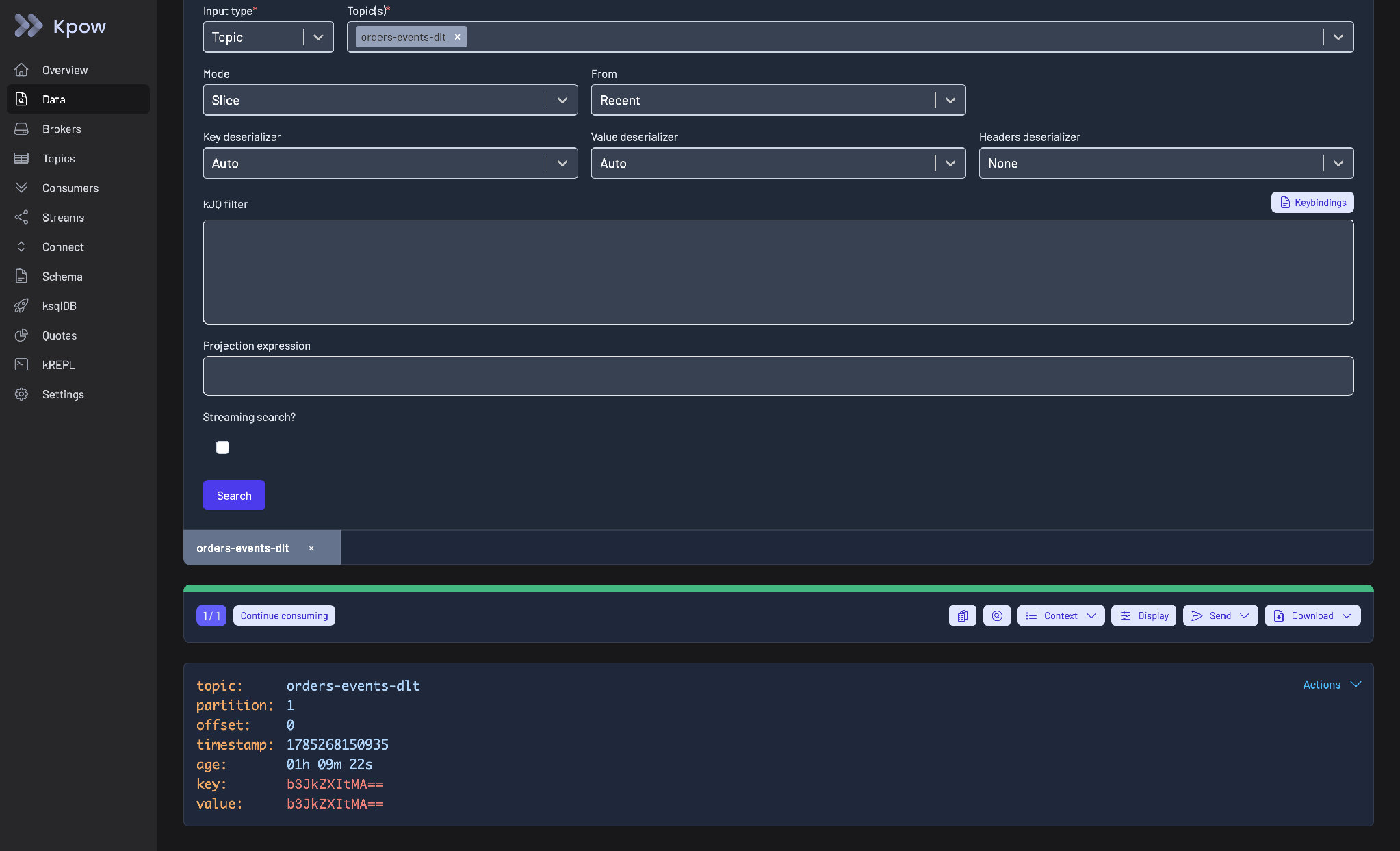
Kpow Data Inspect on a dead letter topic, orders-events-dlt: the result shows the record’s partition, offset, timestamp and age, with the Send and Download menus in the results toolbar and an Actions menu on the record.
If the records in your DLQ are there because of one malformed record stalling a consumer, the upstream problem is a poison pill, and how to find and skip a poison pill covers clearing it. When the DLQ fills with records that fail to decode, how to diagnose a Kafka deserialization error covers finding the cause. The Kafka Connect guide covers where Connect’s error handling sits in a pipeline, and Kafka with Spring Boot covers the listener side.
Kpow live demo
Inspect and replay DLQ records live
Open the Kpow demo to search a topic by header or payload, decode the failed records and see how a replay would be scoped.
Built for platform and data engineers running Kafka in production.
Try the Kpow demoFAQ
What is the best tool to manage a Kafka dead letter queue?
Pick a writer for each application type (Kafka Connect’s DLQ settings, Spring Kafka’s DeadLetterPublishingRecoverer, or a Kafka Streams handler), then a tool to work the DLQ. For triage and governed replay, Kpow’s Data Inspect and Clone to topic cover the most ground. For exact, tracked replay to one consumer, a small custom replay consumer is still the most precise option.
Does Kafka have a built-in dead letter queue?
Only Kafka Connect, and only for sink connectors. Everywhere else a DLQ is a topic your consumer or framework writes to.
How do I replay messages from a Kafka DLQ?
Fix the underlying fault first. Then replay each record to a retry topic that only the failing consumer reads, track what you have replayed, and carry a retry count header so a record that fails again goes back to the DLQ instead of looping. Replaying onto the main topic makes every consumer group process the record again.
Should DLQ records be edited before replay?
Only when the record itself is wrong. Replay the rest byte for byte so the data on the topic stays as the producer wrote it, and produce corrected records as new records with a record of who changed them.
How these tools were scored
A dead letter queue is a topic that holds records a consumer could not process, so the main partition can keep moving. Kafka has no DLQ at the broker level outside Kafka Connect, so every option here is either a framework that writes to one or a tool that reads from one. Five criteria separate them.
1. Does every DLQ record carry its error context?
A DLQ record without the reason it failed, and without the topic, partition and offset it came from, is a record you have to reverse-engineer. A failure reason in a header, alongside a retry count, fixes that, and the frameworks differ on whether they write it for you. Kafka Connect only adds its error headers when errors.deadletterqueue.context.headers.enable is true, and it defaults to false. Spring Kafka’s recoverer adds exception information to standard DLT headers.
2. Can you triage it without writing a script?
The baseline for inspecting a DLQ is CLI scripts against the topic. That is fine for five records and miserable for five thousand. A good tool lets you browse, search and filter the DLQ by header, key or payload field, so you can group failures by cause before you decide what to do with them. Search across topics is its own tooling category, compared in the best tools to search messages across Kafka topics. The steady-state goal for a DLQ is effectively zero messages, because every entry is a signal that something failed and you now pay an operational tax to unwind it. Triage is how you find the underlying fault and stop paying.
3. Can you repair a record, and is the original kept intact?
Some records only need replaying once a downstream fault is fixed. Others need a field corrected first. Those are different operations, and a tool should keep them separate. A byte-for-byte replay leaves the record exactly as the producing service wrote it. That matters in a SOC 2 audit, where the question is whether any other person or process could have altered data on the topic. A repaired record is a new record, and it should be produced as one, with a record of who changed what.
4. Does replay reach only the consumer that failed, and only once?
The simplest replay puts the record back on the main topic. That works at low scale with a single consumer. With several consumer groups on the topic, every one of them processes the replayed record again, and a service that is not idempotent sends a second email or places a second order. Chad Harris, who wrote this page, has seen several multi-million dollar incidents caused by exactly that. The pattern that works well is a retry topic per topic and consumer pair, with the DLQ as the needs-manual-intervention path, so replay is targeted. The tool then has to track what it has already re-driven, and carry a retry count so a record that fails again cannot loop between the DLQ and the retry topic forever.
5. Who can read the DLQ, and who can replay it?
A DLQ holds the payloads your consumers choked on, which often means the unusual ones: the malformed customer record, the field that should have been masked. Reading it and writing from it both deserve access control, and replay deserves an audit trail. The same SOC 2 argument applies here: if anyone can produce to a retry topic, the retry topic is a path for altered data into your pipeline.
Every option is scored from 0 to 10 on each criterion, from the evidence and sources this page cites, and the reason for each score is on its card. The criteria are weighted: Error context on the record counts once, Triage without a script counts once, Repair, original kept intact counts once, Targeted, tracked replay counts once and Access control and audit counts three times, for a total out of 70. Access control and audit counts three times here, because a dead letter queue holds the records that failed, which are often the ones carrying customer data, and replaying one is a write to production. Error context on the record, triage without a script, repair and targeted replay count once. This page is published by Factor House, which makes Kpow. Every option is scored on the same rubric and the same sources: Kpow's per-criterion scores are set the same way as every other option's and are not adjusted, and the weights apply to every option alike. Kpow ranks first on its total of 63 out of 70. The other options follow by total. Conduktor Console is listed last whatever its total; on its total of 42 it would place second.