Best Kafka management tools for sports betting and iGaming operators
ComparisonsThe best Kafka management tool for a sports betting or iGaming operator lets its engineers work on production Kafka without putting anything inline on the path that odds, wagers and settlements take: it runs as one component inside the operator’s own environment and out of the data path, grants production access for a game-day incident and then removes it, names the person behind every action and data query on player and payment topics, masks player and card fields for the people who look, finds one bet across topics without a consumer, and scopes the sportsbook, casino, racing and payments teams to their own topics. FanDuel is a Kpow customer. Kpow, Kafbat UI, AKHQ, Lenses, Confluent Control Center and Conduktor each cover part of that. Scored on the six weighted criteria explained below the rankings, Kpow ranks first with 87 out of 100, ahead of Kafbat UI at 65 and AKHQ at 58.
Tools compared
| Rank | Tool | Total (out of 100) | Out of the data path | Production access on request | Audit trail per person | Who can see unmasked data | Inspecting topic data | Many teams, shared clusters | Cost a year (modelled) |
|---|---|---|---|---|---|---|---|---|---|
| 1 | Kpow | 87 | One container, state in your Kafka, not a proxy | Temporary policies and staged approval | Every action with the IdP user, data queries included | Server-side, show last four, no per-role exemption | kJQ search across topics, streaming search | Tenants and per-action RBAC | $20,880 |
| 2 | Kafbat UI | 65 | One stateless container | Per-resource RBAC, no approval or expiry | Optional, reads at level ALL, no view | Server-side, the same for every viewer | Browse and inspect messages | Per-resource roles per cluster | $11,520 |
| 3 | AKHQ | 58 | One stateless container | Regex groups, no approval or expiry | Opt-in, no reads, no view | Global filters, the same for every viewer | Browse topic data | Groups by resource and cluster pattern | $16,320 |
| 4 | Lenses | 56 | HQ on PostgreSQL, agent and database per cluster | No approval or expiry described | In-product audit log from Team tier | Strictest, no exemption even for admins | SQL over topics | Roles on groups only | $2,880 plus quoted licence |
| 5 | Confluent Control Center | 36 | Dedicated host, broker reporter JAR | Role bindings, no DENY, no approval | Broker principal, not always the person | No masking described | Messages view, Avro key bug | Admin access only, per TD Bank’s talk | $2,880 plus quoted subscription |
| 6 | Conduktor | 59 | Console on PostgreSQL; Gateway proxy in the data path | Owner-approved requests, no expiring grant | 70+ event types with user, in the UI | Console exemptions per user or group | Browse and filter topic data | Per user or group, most permissive grant wins | $122,880; $212,880 with Gateway Core and Protect |
No tool meets every column, and betting operators commonly pair a management tool for people with broker ACLs or IAM policies for services.
The tools, ranked for sports betting and iGaming operators
 Rank 1
 Kpow
87 out of 100 Total
Try Kpow in the live demo No signup needed.
- Cost a year
- $18,000 licence for 4 clusters plus $2,880 operator time, so $20,880 (modelled)
- Sign-in
- SAML, OIDC, LDAP; any SASL mechanism or mTLS to brokers
- Deployment
- One container or JAR, no external database
- Out of the data path ×3 weight, this criterion counts 3 times toward the total
- 9 out of 10
- Production access on request ×2 weight, this criterion counts 2 times toward the total
- 9 out of 10
- Audit trail per person ×2 weight, this criterion counts 2 times toward the total
- 9 out of 10
- Who can see unmasked data
- 6 out of 10
- Inspecting topic data
- 9 out of 10
- Many teams, shared clusters
- 9 out of 10
Why these scores for Kpow
- Out of the data path 9 out of 10
- It is one container or JAR whose state lives in Kafka topics on your own cluster, and it connects as an ordinary Kafka client, so nothing sits between your applications and the brokers.
- Production access on request 9 out of 10
- Temporary policies grant time-boxed access that an admin or a change system calling the Kpow API can create, staged mutations hold any action for approval, and data policies mask fields in inspection, though masking is per resource rather than per viewer.
- Audit trail per person 9 out of 10
- Every action is recorded with the user from the identity provider and the policy that allowed it, including data inspect queries, with a seven-day view in the product, the record written to an audit topic on your own cluster, and webhooks that send it to a SIEM for long-term retention.
- Who can see unmasked data 6 out of 10
- Data policies redact card fields on the server and String SerDes are removed from Data Inspect while policies apply, so a raw deserializer cannot bypass them, but a policy is set per cluster and topic, not per role, so no owning team can be exempted the way Conduktor Console allows.
- Inspecting topic data 9 out of 10
- Data inspect searches across multiple topics with kJQ filters, which its documentation says scan tens of thousands of messages a second from a topic, and streaming search keeps a query running until it reaches its result or scan limit; Lenses’ SQL scores higher.
- Many teams, shared clusters 9 out of 10
- Tenants scope each team to its own resources on a shared cluster, which is how TD Bank sets up every onboarded team, and RBAC adds Allow, Deny or Stage per action.
For a sports betting or iGaming operator. Kpow runs inside the operator’s own environment and gives every team a governed way into production without touching the path odds and wagers take. Temporary policies give an engineer extra rights for one incident and expire on their own, staged mutations hold an offset reset or a topic delete for a second person, and the audit log records each action and data query with the person who made it. Data policies mask player and card fields in inspection, Data Inspect finds one bet across several topics without a consumer, and tenants scope the sportsbook, casino, racing and payments teams to their own topics. FanDuel is a Kpow customer.
Where it falls short. Kpow governs people working through Kpow, and applications still authenticate to the brokers with their own principals, so broker ACLs or IAM policies remain the control for services. It masks what people see in inspection and does not encrypt the data held in Kafka. Its masking is set per resource, not per viewer, its search runs on kJQ filters and not SQL, and one instance stops at 12 clusters. The in-app audit view covers seven days and Kpow’s own topics default to one week of retention, so long-term records belong in a SIEM through webhooks. Tenants, RBAC, masking and the audit log are Enterprise features; Community Edition is free for 3 clusters and 10 users.
Cost a year. $20,880 on this page’s model of a betting operator running 4 clusters (development, test, and production clusters for the sportsbook and for player accounts and payments) for 100 engineers, testers and analysts. Kpow Enterprise is published from $4,500 per cluster per year with 100 users included, so the licence is $18,000, and the model adds 2 engineer-hours a month at $120 an hour, $2,880, to run one container and keep it current. Kpow is also sold on AWS Marketplace as Kpow for Apache Kafka (Annual), which bills it on the operator’s AWS invoice.
 Rank 2
 Kafbat UI
65 out of 100 Total
- Cost a year
- $0 licence, about $11,520 in operator time (modelled)
- Sign-in
- OAuth2, OIDC, LDAP or Active Directory; no SAML
- Deployment
- One stateless container
- Out of the data path ×3 weight, this criterion counts 3 times toward the total
- 9 out of 10
- Production access on request ×2 weight, this criterion counts 2 times toward the total
- 4 out of 10
- Audit trail per person ×2 weight, this criterion counts 2 times toward the total
- 6 out of 10
- Who can see unmasked data
- 4 out of 10
- Inspecting topic data
- 8 out of 10
- Many teams, shared clusters
- 6 out of 10
Why these scores for Kafbat UI
- Out of the data path 9 out of 10
- It is one stateless container with no database and no proxy, the same pass as Kpow.
- Production access on request 4 out of 10
- RBAC grants actions per resource and a cluster can be set read-only, but there is no approval step, no time-boxed grant, and its masking applies the same way to every viewer.
- Audit trail per person 6 out of 10
- Its audit log names the logged-in user and records reads when the level is set to ALL, but it writes to a topic or the console with no view in the product, so reading the trail is something you build.
- Who can see unmasked data 4 out of 10
- Masking runs on the server and every viewer sees the same result, with no per-role override yet, so the team that owns a card topic cannot be shown the real value while others see it masked.
- Inspecting topic data 8 out of 10
- Message browsing and inspection are core features of the open-source UI.
- Many teams, shared clusters 6 out of 10
- Roles scope permissions per resource and list the clusters they apply to, with no tenant view of a team’s own resources.
For a sports betting or iGaming operator. Kafbat UI is the maintained open-source fork of the original kafka-ui, Apache 2.0, with free RBAC, server-side masking policies and an optional audit log. For a smaller operator with one engineering team and an OIDC identity provider, it covers browsing topics, inspecting messages and topic work at no licence cost.
Where it falls short. There is no approval step and no access that expires, so production rights for a game-day incident are granted and removed by hand. The audit log has no view in the product, masking cannot exempt the team that owns the data, and roles carry no tenant view of a team’s own resources. There is no SLA, and paid help is a professional services engagement from the maintainers, quoted and not listed.
Cost a year. $11,520 on this page’s estimate, with no licence fee. Running, securing and upgrading it is 6 engineer-hours a month at $120 an hour, $8,640, and an operator that signs people in with SAML also runs a proxy such as oauth2-proxy in front of it, 2 hours a month, $2,880.
 Rank 3
 AKHQ
58 out of 100 Total
- Cost a year
- $0 licence, about $16,320 in operator time and review (modelled)
- Sign-in
- LDAP, OIDC, header auth; no SAML
- Deployment
- One stateless container
- Out of the data path ×3 weight, this criterion counts 3 times toward the total
- 9 out of 10
- Production access on request ×2 weight, this criterion counts 2 times toward the total
- 3 out of 10
- Audit trail per person ×2 weight, this criterion counts 2 times toward the total
- 4 out of 10
- Who can see unmasked data
- 4 out of 10
- Inspecting topic data
- 8 out of 10
- Many teams, shared clusters
- 5 out of 10
Why these scores for AKHQ
- Out of the data path 9 out of 10
- It is one stateless container with no database and no proxy, the same pass as Kpow.
- Production access on request 3 out of 10
- Groups bind actions to resources by regex, but there is no approval step or time-boxed grant, masking is global, and without the JWT signing secret the restriction is in the UI only.
- Audit trail per person 4 out of 10
- Audit events are opt-in to a Kafka topic, reads are not recorded, and there is no view for the trail.
- Who can see unmasked data 4 out of 10
- Its masking policies are global, so every viewer sees the same thing, and no guard against reading a topic around them is documented.
- Inspecting topic data 8 out of 10
- Topic data browsing is a core AKHQ feature.
- Many teams, shared clusters 5 out of 10
- Groups combine resource types with regex patterns on names and clusters, which limits what a role can reach, but there is no tenant view of a team’s own resources.
For a sports betting or iGaming operator. AKHQ is free under Apache 2.0 and configured in YAML that fits a GitOps review, with roles that combine resource types and cluster patterns. It is a common first step up from command-line scripts for a team that mostly needs to browse topics and consumer groups.
Where it falls short. Its documentation warns that if the JWT signing secret is not set, the API will not enforce the group role, so a misconfiguration turns access control into a UI restriction. Audit is opt-in and reads are not in it, which leaves no record of who opened a player or wager topic, there is no approval step or expiring grant, and masking is the same for every viewer.
Cost a year. $16,320 on this page’s estimate, with no licence fee. Running, securing and upgrading it is 6 engineer-hours a month at $120 an hour, $8,640; an operator on SAML runs oauth2-proxy in front of it, 2 hours a month, $2,880; and the model adds one access review a year, 40 hours or $4,800, because of the JWT secret behaviour above.
Compare Kpow vs AKHQAKHQ review
 Rank 4
 Lenses
lenses.io
56 out of 100 Total
- Cost a year
- $2,880 operator time, plus a licence quoted above 15 users (modelled)
- Sign-in
- SSO with Okta, Keycloak, OneLogin, Google, Entra ID
- Deployment
- HQ on PostgreSQL, an agent and database per cluster
- Out of the data path ×3 weight, this criterion counts 3 times toward the total
- 4 out of 10
- Production access on request ×2 weight, this criterion counts 2 times toward the total
- 4 out of 10
- Audit trail per person ×2 weight, this criterion counts 2 times toward the total
- 7 out of 10
- Who can see unmasked data
- 6 out of 10
- Inspecting topic data
- 10 out of 10
- Many teams, shared clusters
- 6 out of 10
Why these scores for Lenses
- Out of the data path 4 out of 10
- It runs a central HQ on PostgreSQL plus an agent and an agent database beside every cluster, and HQ has no high-availability option.
- Production access on request 4 out of 10
- Its masking is the strictest view-time model, global with no escape even for admins, but no approval step or time-boxed grant is described.
- Audit trail per person 7 out of 10
- Audit logs can be read in the product, with no need to build a consumer first.
- Who can see unmasked data 6 out of 10
- Its masking is the strictest of the consoles here, with no escape even for admins, but there is no per-group exemption, so it sits below Conduktor Console.
- Inspecting topic data 10 out of 10
- SQL over topics is the centre of the product and the strongest query model on this page, ahead of Kpow’s kJQ.
- Many teams, shared clusters 6 out of 10
- Roles attach to groups only, never to individuals, and no scoped view per team is described.
For a sports betting or iGaming operator. Lenses brings vendor-backed RBAC, SSO, in-product audit logs and SQL Studio for querying topics, which is the reason to choose it if trading, risk or customer teams need SQL over Kafka. Its data policies redact by field name across Kafka topics, Postgres tables and Elasticsearch indices, with no exemption even for administrators.
Where it falls short. Every cluster adds an agent and a database to deploy and patch, and HQ is a single node that every cluster depends on, which is a weak point for a business whose busiest hours are the ones a game is on. No approval step or time-boxed grant is described, and roles attach to groups only.
Cost a year. $2,880 of operator time on this page’s estimate, 2 hours a month at $120 an hour, plus a licence that is not published. The published Team Edition is $4,000 a year for up to 15 users on one cluster, so 100 people across 4 clusters is Multi-Kafka Enterprise at a custom quote.
 Rank 5
 Confluent Control Center
confluent.io
36 out of 100 Total
- Cost a year
- $2,880 operator time, plus a Confluent Platform subscription that is quoted (modelled)
- Sign-in
- OIDC on self-managed; no SAML
- Scope
- Confluent Platform clusters only
- Out of the data path ×3 weight, this criterion counts 3 times toward the total
- 4 out of 10
- Production access on request ×2 weight, this criterion counts 2 times toward the total
- 2 out of 10
- Audit trail per person ×2 weight, this criterion counts 2 times toward the total
- 4 out of 10
- Who can see unmasked data
- 2 out of 10
- Inspecting topic data
- 6 out of 10
- Many teams, shared clusters
- 4 out of 10
Why these scores for Confluent Control Center
- Out of the data path 4 out of 10
- It is not a proxy, but it needs a dedicated host of 4 cores, 8 GB and 200 GB and the Confluent Metrics Reporter on each broker.
- Production access on request 2 out of 10
- Access runs through Confluent RBAC role bindings, which have no DENY rules, and no approval step, time-boxed grant or masking is described.
- Audit trail per person 4 out of 10
- Confluent Server’s audit logs record authorization decisions for the connection’s principal, which is not always the person behind a tool.
- Who can see unmasked data 2 out of 10
- No masking of message fields is described, so anyone allowed to read a topic in Control Center sees the full value.
- Inspecting topic data 6 out of 10
- Its Topics > Messages view browses topic data, and its review records a rendering bug for compound, nested Avro keys in that view and a Safari authentication failure when browsing messages.
- Many teams, shared clusters 4 out of 10
- TD Bank’s platform team said in its talk that Control Center could only accept admin access and was not scalable for their clients, which is why those clients moved to Kpow.
For a sports betting or iGaming operator. Control Center is the console that comes with Confluent Platform, with Confluent RBAC extending the same role bindings to Connect, ksqlDB and Schema Registry. On a topology that is Confluent Platform and nothing else, it is already there.
Where it falls short. It is built for Confluent Platform clusters, so it does not reach Confluent Cloud, Amazon MSK or other distributions an operator may run in the states or countries it is licensed in. It describes no masking of player or card fields, no approval step and no expiring grant, and its role bindings cannot carve a delete out of a broader role because they have no DENY rules.
Cost a year. $2,880 of engineering time on this page’s estimate, 2 hours a month at $120 an hour, on top of a Confluent Platform subscription that Confluent quotes and does not publish, so the total cannot be compared with the others here.
Compare Kpow vs Confluent Control CenterConfluent Control Center review
 Rank 6
 Conduktor
conduktor.io
59 out of 100 Total
- Cost a year
- 100 seats at $1,200 plus $2,880 operator time, so $122,880; Gateway Core adds $60,000 and Gateway Protect, which carries encryption and masking, a further $30,000 (modelled)
- Sign-in
- LDAP, OIDC; no SAML described
- Deployment
- Console on PostgreSQL 13+; data-level controls through Gateway, a proxy
- Out of the data path ×3 weight, this criterion counts 3 times toward the total
- 3 out of 10
- Production access on request ×2 weight, this criterion counts 2 times toward the total
- 6 out of 10
- Audit trail per person ×2 weight, this criterion counts 2 times toward the total
- 8 out of 10
- Who can see unmasked data
- 7 out of 10
- Inspecting topic data
- 8 out of 10
- Many teams, shared clusters
- 7 out of 10
Why these scores for Conduktor
- Out of the data path 3 out of 10
- Console needs PostgreSQL 13 or later, and its encryption, data-level masking and Virtual Clusters only work when client traffic goes through Gateway, a proxy in the data path.
- Production access on request 6 out of 10
- Masking can exempt users or groups, which beats every other tool here on who sees unmasked data, and cross-team access requests are approved by the owning team, but no expiring grant is described and topic creation that passes policy is a direct API call.
- Audit trail per person 8 out of 10
- Console logs produce, consume and admin requests across more than 70 event types with user, IP and timestamp, browsable in the UI and exported as CloudEvents.
- Who can see unmasked data 7 out of 10
- Console masking policies can exempt users or groups, so an owning team sees the real value while everyone else sees it masked, the best score here, though Flink SQL results bypass masking; Gateway’s masking of the data itself is a separate control that sits in the data path.
- Inspecting topic data 8 out of 10
- Console browses and filters topic data.
- Many teams, shared clusters 7 out of 10
- Permissions are set per user or group across clusters, but a user in several groups inherits the most permissive grant, and Virtual Clusters for multi-tenancy need Gateway.
For a sports betting or iGaming operator. Conduktor pairs Console, a web UI, with Gateway, a Kafka protocol proxy. Console’s masking can exempt the team that owns a player or payment topic while everyone else sees it masked, the best result on this page for that criterion, and its audit log is browsable in the product. The full picture is in the Conduktor review.
Where it falls short. Conduktor’s Gateway documentation describes it as “a Kafka-compliant middle layer between clients and Kafka clusters”, and that is where field encryption, masking of the data itself, policy enforcement on client traffic and Virtual Clusters are applied. An operator that buys Conduktor for those controls connects its pricing, wagering and settlement services through Gateway, which puts a vendor’s proxy inline on the odds path while games are in play, and inside PCI DSS scope wherever card data passes through it. Console alone connects to clusters directly and masks in its UI, but it needs its own PostgreSQL. Per-seat pricing grows with every engineer, trader and analyst who needs access.
Cost a year. $122,880 on this page’s model of 100 people. Conduktor’s published Team Edition price is $1,200 a seat a year, $120,000, and the model adds 2 engineer-hours a month at $120 an hour, $2,880. On AWS Marketplace, Conduktor Enterprise lists Gateway Core, which carries Virtual Clusters and policy enforcement, at $60,000 a year and Gateway Protect, the add-on for encryption and masking, at a further $30,000, so the data-level controls take the total to $212,880. Conduktor prices Gateway per cluster with a 3-cluster minimum, and the listing does not say how many clusters that figure covers.
Compare Conduktor review
What sports betting and iGaming operators need from a Kafka management tool
This page ranks tools against what sports betting, racing and online casino operators need from Kafka tooling, as far as those needs can be read from what the industry, its technical standards and its regulators have published. A betting operator’s payment flows look much like a payments company’s, covered in best Kafka management tools for payments companies, and its mix of a price-sensitive core with heavy, bursty customer traffic is closest to best Kafka management tools for crypto exchanges. An operator whose main concern is many product teams on shared clusters can also read best Kafka management tools for ecommerce companies and marketplaces, and for a regulator’s view of shared clusters in finance, best Kafka management tools for banks.
Kafka is common in this industry. Kai Waehner’s survey of Apache Kafka in the gaming industry, including bookmakers, betting and gambling describes real-time betting on the result of the next play, a bet delay and approval system for live bets built on the event stream, fraud detection and responsible gaming compliance, and notes that betting is usually regional, mainly because of laws and compliance. The same survey quotes a games company’s platform director on an almost ten times difference in workload between peak and low peak, and betting traffic follows the sporting calendar in the same way, so the hours when a cluster is under most load are the hours when the business can least afford a fault.
The technical rules are written for the whole wagering system. GLI-33, the Gaming Laboratories International standard for event wagering systems, which US state regulators publish alongside their own rules (as North Carolina’s gaming regulator does), applies its security controls to components that record, store, process, share, transmit or retrieve sensitive information, requires logical access attempts to be recorded in a secure log, asks for user administration that gives an adequate separation of duties, and requires a documented method to make sure raw production data is not used in testing. In Great Britain the Gambling Commission’s remote technical standards security requirements are based on Annex A of ISO/IEC 27001:2022. Player accounts carry identity and KYC data, which Article 25 of the GDPR asks to keep from an indefinite number of people by default, and deposits and withdrawals bring in PCI DSS wherever card data reaches the operator’s own systems.
Each of the six criteria this page scores comes from one of those needs, and each has a detail that general lists of Kafka tools leave out.
Out of the data path. A management tool reaches a cluster either as an ordinary Kafka client beside the applications or as a proxy that producers and consumers connect through. Conduktor Console connects to clusters directly, but it needs an external PostgreSQL database, and Conduktor’s field encryption, masking of the data itself, policy enforcement on client traffic and Virtual Cluster multi-tenancy run through Conduktor Gateway, which Conduktor’s own documentation describes as a Kafka proxy between client applications and brokers. On a plain reading of GLI-33, the difference is one of scope as well as latency. A proxy that pricing, wagering and settlement services produce through transmits every wager that passes it, so it falls under the standard’s controls for components that transmit sensitive information, at full volume and at kick-off. A console that connects as a client retrieves sensitive data only when a person displays a topic. GLI-33 also says communication with third-party service providers shall not interfere with or degrade normal wagering system functions, and a tool that sits beside the brokers is not on the path a bet takes. The network footprint of a client-side tool is short to describe for a firewall review: Kafka traffic goes over the Kafka protocol with the standard clients, and the only plain HTTP calls on the data side are to the REST APIs of the services it manages, such as the Kafka Connect REST API, plus schema registry and cloud provider APIs where those are configured.
Production access on request. Most of the work that touches production in a betting operator happens during an incident, and incidents cluster on the busiest days. A tool that only knows permanent roles leaves two bad choices: give engineers standing production rights they rarely need, or wait for a role change while a consumer falls behind during a game. GLI-33’s requirement for procedures to assign, review, modify and remove access rights for each user points the other way, toward access granted for a reason and removed afterwards. Permissions also need to be split where the risk differs. Reading topic data and downloading it can be separate actions, so an engineer can search wager records without exporting them, and offset resets, truncation and configuration edits can each be granted on their own, which is least privilege as NIST defines it, applied to a Kafka console through Kpow’s action list.
Audit trail per person. The brokers see the tool’s own service account and not the engineer, so only the tool’s log can name the person who opened a player topic or reset a settlement consumer’s offsets. That log should include data queries as well as changes, and that has a consequence of its own: people type names, account numbers and card numbers into message filters, so an audit log that records query text holds personal data too, and its retention and access rules have to be set with the minimisation and storage limits of Article 5 of the GDPR in mind. Best tools for Kafka audit logging compares the layers in detail.
Who can see unmasked data. Player topics hold identity documents, addresses, dates of birth and payment details, and developers and testers open them for ordinary debugging. GLI-33’s rule that raw production data is not used in testing is easiest to keep when the tool shows the structure of a message with those fields masked. Masking at display time also avoids a trap that security teams know well: field encryption handled inside a UI tool makes that one application the holder of every key, which runs against the separation of key management duties in NIST SP 800-57 on key management is built on, while display-time masking protects fields without giving the tool any key material. Kpow masks per topic and not per viewer, which is why Conduktor Console, whose policies can exempt the owning team, scores higher on this criterion.
Inspecting topic data. When a bet settles wrongly, someone has to find that one bet across the wager, pricing and settlement topics. An exact-key search is a targeted lookup: the tool serialises the typed key and hashes it to find the one partition that can hold it, which is why it is fast, and it only works when the producer used the default partitioner and serialised the key the same way, as the producer configuration reference describes. Where a service uses a custom partitioner or a different key format, a filter on the key field scans the topic instead and finds the record regardless.
Many teams, shared clusters. Sportsbook, casino, racing, payments, risk and data teams share a few clusters, and GLI-33 asks for user administration with an adequate separation of duties. A management tool for this industry has to scope each team to its own topics and consumer groups, so a payments team can manage its own consumers while the platform team keeps control of who may connect to the cluster at all.
What sports betting and iGaming operators use Kpow for
Factor House counts FanDuel among its Kpow customers. FanDuel has not published how it runs Kafka or what it uses Kpow for, so its card carries public information about the company itself, not a description of its Kpow setup.
-

FanDuel
- Online sports betting
- Racing
Public context about the company. How it uses the product has not been published.
FanDuel started in 2009 to give sports fans new ways to engage with the games they follow, and its products are available in the United States and Canada. Its about page lists a sportsbook, casino, fantasy and racing among its products and promises fair odds, money that is secure, data that is protected and design for responsible play. FanDuel is a Kpow customer.
Source: FanDuel, about FanDuel
How sports betting and iGaming operators run their Kafka with Kpow
The workflows below are how a betting operator’s platform team puts Kpow to work on its clusters, each built from a documented Kpow feature linked in its text.
Install it beside the clusters. Kpow runs as one Docker container or Java JAR, or on Kubernetes with the Helm charts, inside the operator’s own network or cloud account. It needs no external database, because its state lives in topics on the operator’s own clusters, and it connects as an ordinary Kafka client with the same cluster security settings as any other client, so odds and wagers keep travelling from applications to brokers directly. One instance manages up to 12 clusters, which covers an operator that runs separate clusters for different states or countries.
Watch lag against retention, not only against a number. Kpow shows each consumer group’s lag by topic and partition, and publishes it with broker, topic and connector metrics on Prometheus endpoints for the operator’s own alerting. The lag alert that matters most compares a group’s lag with the topic’s retention: once lag approaches retention, records are about to be deleted before they are read, because the broker’s retention settings delete old segments whether or not anyone consumed them, and that is data loss rather than delay. Stuck partitions and groups that rebalance constantly are the other two states worth an alert. Best tools to monitor Kafka consumer lag compares the options.
Treat a producer failure as the bigger incident. Consumers are built to tolerate downtime and catch up, but a service that cannot produce fails the business operation it was producing for, and in a sportsbook that is a bet that is not accepted. How long a producer keeps trying is bounded by delivery.timeout.ms and retries in the producer configuration, so a platform team watches topic throughput and producer errors alongside consumer lag, and a topic whose throughput drops to zero on a game day is the first thing to look at.
Let a person decide, not an automatic rule. Automation that acts on a cluster by itself is unsafe as a general rule: killing every consumer that stops advancing can turn one poison message into a rebalance storm, and restarts themselves trigger rebalances, which is why Apache Kafka added static membership in KIP-345. Kpow surfaces the state and leaves the action to an engineer. When a consumer has to skip or replay messages, the group actions reset, clear or skip offsets for a whole group, a host, a topic or a single partition, scheduled to run once the group is stopped.
Grant game-day access and take it back. Where an engineer needs extra rights for one incident, an admin, or a ticketing system calling the Kpow API, creates a temporary policy that expires on its own. With staged mutations, a role can be set to Stage on actions such as deleting a topic or resetting offsets in production, so the request waits in Kpow until an administrator approves or denies it. Best tools to control destructive Kafka operations compares the approaches.
Find one bet across topics. When a bet, a price or a settlement looks wrong, an engineer uses Data Inspect with a kJQ filter to search for one bet or account identifier across several topics at once, on the server, by key, value or header. Data policies redact player names, identity fields and card numbers in the results, down to the last four digits of a card number, so the engineer sees the event history without the player’s details.
Give each team its own view. A tenant includes or excludes topics, consumer groups and whole Connect clusters or schema registries by name, prefix or suffix, so a racing team whose topics start with racing- sees only those, plus the topics its consumer groups read. Tenants and RBAC are defined in a YAML file, which fits a GitOps review, and RBAC sets Allow, Deny or Stage per action and resource, with Deny winning where policies overlap.
Sign people in through the company directory. Kpow takes SAML from Okta or Microsoft Entra ID, any OpenID Connect provider, or LDAP, and maps directory groups to roles and tenants, so access rights follow the same joiner, mover and leaver process as every other system.
Keep a record of who did what. The audit log records each action, data inspect queries included, with the user from the directory and the policy that allowed it. Kpow shows the last seven days in the product and writes the record to the __oprtr_audit_log topic on the operator’s own cluster, where Kpow’s topics default to one week of retention, so for a longer record webhooks send mutations, queries or both to Slack, Microsoft Teams or the operator’s SIEM.
To see these screens before installing anything, the live Kpow demo needs no signup and shows data inspect, consumer groups, topic management and the audit trail in the __oprtr_audit_log topic on MSK Secondary. The demo has no SSO, tenants or data policies configured, so sign-in, per-team views and masking are the things to test in the operator’s own environment. To run the workflows against the operator’s own clusters, install Kpow from its container image or JAR; tenants, RBAC, temporary policies, staged mutations, masking and the audit log are Kpow Enterprise features, and Community Edition is free for 3 clusters and 10 users.
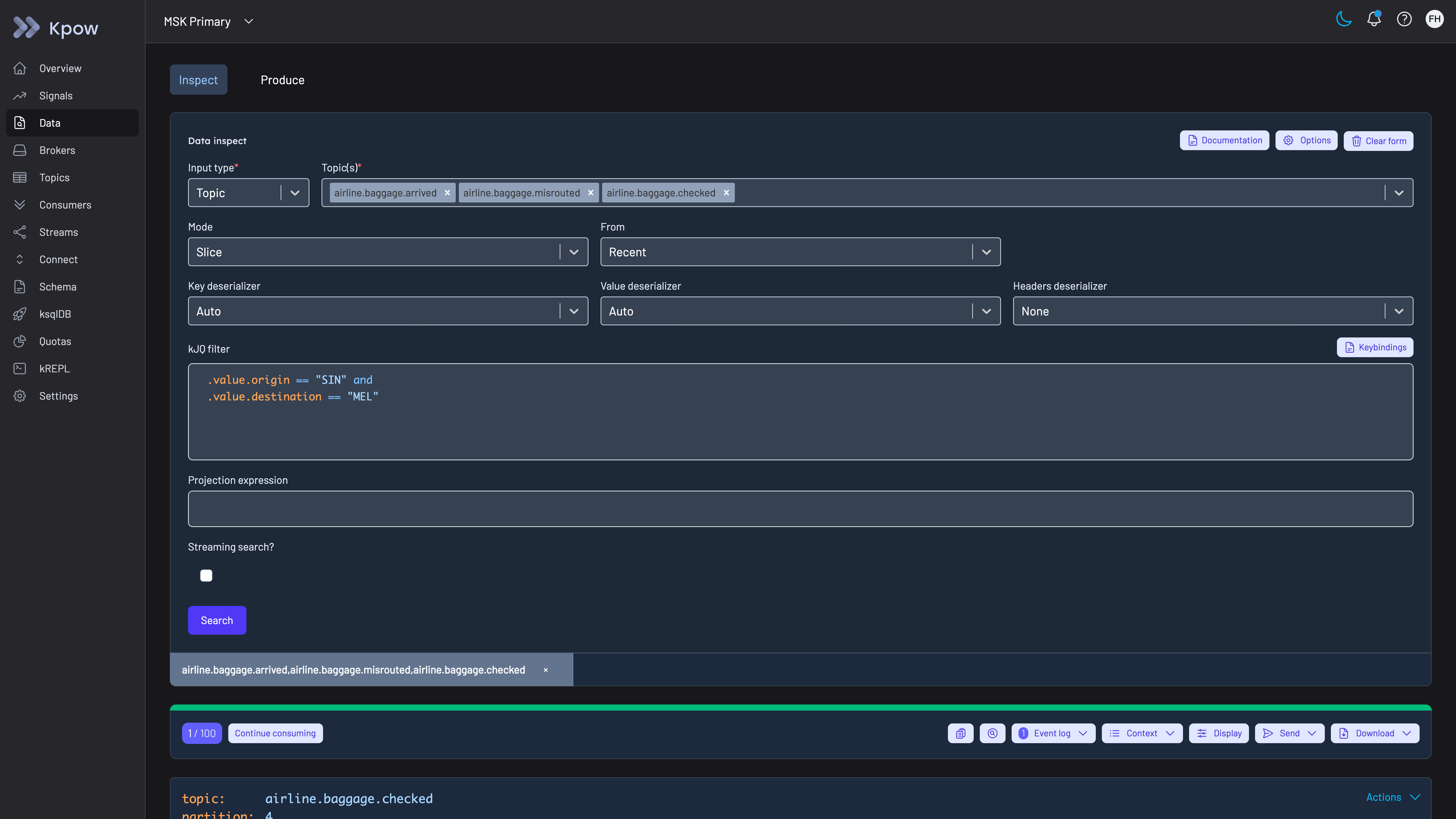
Kpow live demo
Open Kpow the way a sportsbook's engineers would
The live Kpow demo needs no signup. It runs on two Amazon MSK clusters: search topics for one key, follow a consumer group's lag, then read the audit trail on the __oprtr_audit_log topic of the MSK Secondary cluster.
For platform teams running Kafka for odds, wagers, player accounts and payments on shared clusters.
Try the Kpow demoFAQ
What is the best Kafka UI for a sportsbook?
On this page’s rubric, Kpow: it runs as one container with no external database and nothing in the data path, grants time-boxed and approved production access, records every action and data query with the person, masks player and card fields in inspection, searches several topics at once on the server and scopes each team to its own topics. Kafbat UI is the strongest free option for a single team that signs in with OIDC. Conduktor scores highest on who can see unmasked data. FanDuel is a Kpow customer.
Does a Kafka management tool need to be a proxy to govern access?
No. Governing what people can see and do in a tool, with tenants, RBAC, masking in inspection and an audit log, works from a tool that connects as an ordinary Kafka client. A proxy is needed to enforce policy on application traffic or to encrypt records before they reach the brokers, and it puts a component inline in front of every producer and consumer that prices, accepts or settles a bet.
Does GLI-33 apply to an operator’s Kafka tooling?
GLI-33 is written for the event wagering system as a whole, and a jurisdiction that adopts it decides how it applies. Its security appendix covers components that record, store, process, share, transmit or retrieve sensitive information, so a console that can display player or wager topics is in that set when someone uses it, and a proxy that wagering services produce through is in it all the time. The practical requirements for the tool are the ones on this page: recorded access, access rights assigned and removed per user, separation of duties, and production data kept out of testing.
How should a betting operator monitor Kafka on its busiest days?
Alert on consumer lag compared with topic retention, on stuck partitions and on groups that keep rebalancing, and watch producer errors and topic throughput as closely as lag, because a producer that fails is a bet that is not accepted. Kpow publishes lag and cluster metrics on Prometheus endpoints for the operator’s own alerting and leaves corrective actions, such as offset resets, to an engineer.
Is a free Kafka UI enough for an iGaming operator?
For a small team browsing topics and consumer groups, often yes. Kafbat UI and AKHQ are free and run as one container each, and Kpow Community Edition is free for up to 3 clusters and 10 users, with topic search and inspection, consumer group and offset management, schema registry and Kafka Connect. None of the free options gives time-boxed production access or an audit trail that can be read in the product; in Kpow those are Enterprise features.
How these tools were scored
Six criteria, each taken from published accounts of Kafka in gaming and betting or from what GLI-33, GDPR and PCI DSS ask of systems that handle player and payment data, score every option from 0 to 10. They are listed here in order of weight; the weights add up to 10, so the total is out of 100.
1. Out of the data path. A management tool that runs in the operator’s own environment, connects as an ordinary Kafka client and keeps no data outside the operator’s clusters adds nothing between pricing, wagering and settlement services and the brokers. Scored lower: tools that need an external database, and tools whose controls work only when application traffic passes through a vendor’s proxy. A self-hosted container with no external database and no proxy scores 9, a tool with a database of its own 6, one with several databases or a component on the brokers 4, and one that needs both a database and a proxy for its controls 3; 10 is kept for an option with nothing to deploy at all. This criterion is scored the same way on every Factor House page that uses it, and only its weight changes with the reader.
2. Production access on request. Engineers get production rights for an incident and lose them afterwards, through a time-boxed grant, an approval step, or both. Scores are the same as on the banking and payments pages.
3. Audit trail per person. When people work through a shared tool, the broker only sees the tool’s own service account, so only the tool’s log can name the person. An operator needs that log to include data reads as well as changes, and to be readable without building a consumer first. Scores are the same as on the banking page.
4. Who can see unmasked data. This criterion asks what people see once they are in a topic: who can see the real player or card value through the tool, whether masking can be bypassed, and whether the team that owns the data can be exempted while everyone else sees it masked. The scores are the same as on best tools for Kafka data masking, and Control Center, which that page does not score, gets 2 because no masking is described for it. Conduktor scores highest here and Kpow does not.
5. Inspecting topic data. Tracing a bet means finding specific messages by key, value or header across several topics, on the server, without writing a consumer against production. SQL over topics scores highest, filtered search across topics next, and browsing or filtering one topic at a time a point lower. Scores are the same as on the insurers page, and best tools to search messages across Kafka topics covers search in detail.
6. Many teams, shared clusters. Sportsbook, casino, racing, payments and data teams on a handful of clusters need each team scoped to its own topics, consumer groups and connectors. Scores are the same as on the banking page; best tools for Kafka role-based access control (RBAC) compares the permission models in more detail.
Directory sign-in and on-prem and cloud reach are not scored separately on this page; the banking page scores both, and Kpow leads on each there. Encrypting records before they reach the brokers is not scored either, because it is the work of a proxy or of the applications themselves and not of a management tool; of the tools here only Conduktor offers it, through Gateway. Who has bought each tool is also left out of the scores.
The cost figures model a betting operator running 4 clusters (development, test, and production clusters for the sportsbook and for player accounts and payments) for 100 engineers, testers and analysts at $120 an engineer-hour, and each card prints its own assumptions. The general listicle view, without this weighting, is in best Kafka management tools for 2026.
Every option is scored from 0 to 10 on each criterion, from the evidence and sources this page cites, and the reason for each score is on its card. The criteria are weighted: Out of the data path counts three times, Production access on request counts twice, Audit trail per person counts twice, Who can see unmasked data counts once, Inspecting topic data counts once and Many teams, shared clusters counts once, for a total out of 100. Out of the data path counts three times because a betting operator's Kafka carries odds, wagers and settlements while games are in play, and a tool that sits between the applications and the brokers puts a vendor's proxy inline on the odds path, inside the scope of the GLI-33 security controls and of PCI DSS wherever card data passes through it, while a tool with a database of its own is one more system to patch and keep available. Production access on request and the per-person audit trail count twice: incidents happen in production on the busiest days of the sporting calendar, and player, KYC and payment topics have to show who looked at them and what they searched for. Who can see unmasked data, inspecting topic data and many teams on shared clusters count once each. This page is published by Factor House, which makes Kpow. Every option is scored on the same rubric and the same sources: Kpow's per-criterion scores are set the same way as every other option's and are not adjusted, and the weights apply to every option alike. Kpow ranks first on its total of 87 out of 100. The other options follow by total. Conduktor is listed last whatever its total; on its total of 59 it would place third.
Related reading
- Kafka: the complete guide
- Best Kafka management tools for payments companies
- Best Kafka management tools for crypto exchanges
- Best Kafka management tools for ecommerce companies and marketplaces
- Best Kafka management tools for banks
- Best Kafka governance tools for financial services
- Best tools to monitor Kafka consumer lag
- Best tools for Kafka data masking
- Best tools for Kafka audit logging